

Sign Up
Thank you for Submitting!
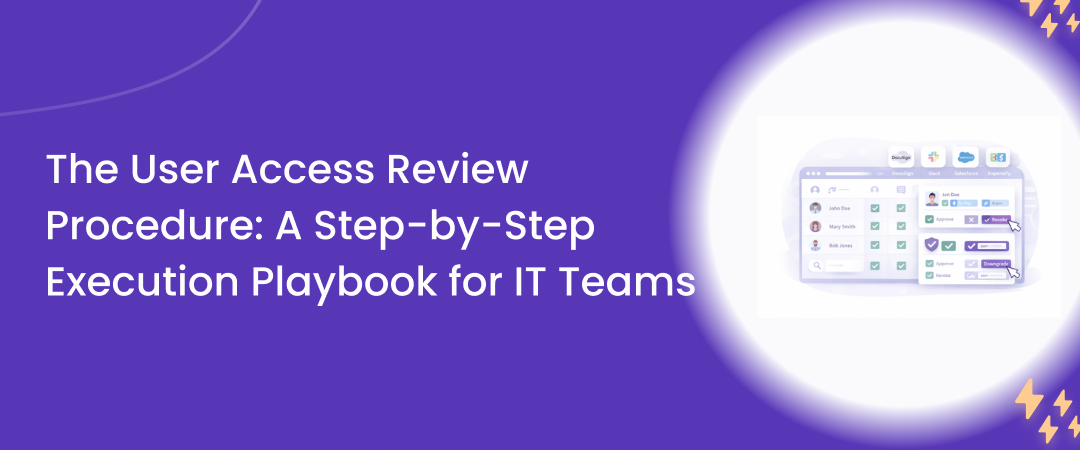
# The User Access Review Procedure: A Step-by-Step Execution Playbook for IT Teams A rigorous user access review procedure is no longer a compliance nicety. It is a frontline control for stopping privilege creep, orphaned accounts, and silent SaaS sprawl before they show up as audit findings or security incidents. Research from a 2025 compliance survey found that 65% of companies faced fines in the last three years due to weak access review processes. At the same time, an IAM metrics review in 2026 noted that leading enterprises now track review completion SLAs above 95% within 30 days for user access campaigns. This playbook gives IT teams a practical, step-by-step user access review process you can run repeatedly, backed by data, expert guidance, and automation patterns that scale across SaaS and cloud.
A user access review procedure is a formal, repeatable workflow where IT and business owners periodically validate who has access to which systems, what level of access they have, and whether that access is still justified. In practice, it forms the backbone of:
Access governance and least privilege enforcement
Compliance controls such as SOC2 user access review and internal IT security review steps
SaaS security controls for fast growing, cloud-first environments
A 2026 IAM best practices guide notes that quarterly user access reviews are now the baseline for compliance-driven organizations. Another advisory in 2026 highlighted that automating access certification and tracking SLA completion is the single biggest step to reduce risk.
Periodic reviews catch problems that identity and access management (IAM) provisioning workflows miss. Think of it as a scheduled health check for your access controls. Three reasons it matters:
Compliance risk reduction: A 2025 audit report sample showed that 58% of organizations underwent four or more audits in 2025, and user access review was almost always in scope.
Security hygiene: Privilege creep and incomplete de-provisioning remain leading root causes of security incidents.
Cost and SaaS governance: Unused licenses and abandoned SaaS accounts increase spend and expand the attack surface.
Many IT teams still run user access review procedures with spreadsheets, email threads, and ad hoc exports from each application. A 2025 compliance insights report called this manual approach a recognized source of risk and inefficiency. To move from ad hoc to repeatable, you need a consistent access review workflow across your environment.
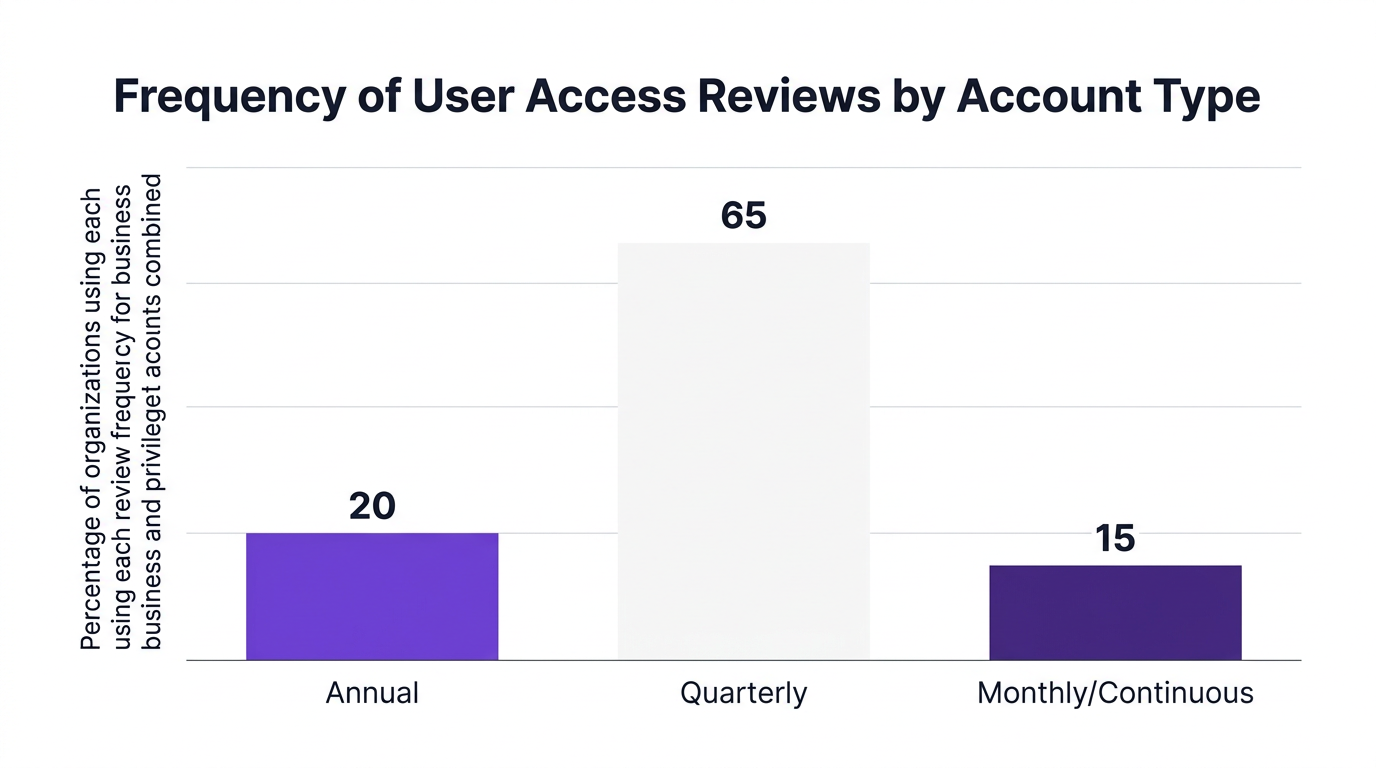
A 2026 IAM study on review frequency found:
Annual reviews remain for some low-risk business applications
Quarterly reviews dominate for most business systems
Monthly or near continuous reviews are becoming standard for high risk and privileged accounts
This is your north star cadence:
Quarterly user access review procedure for business SaaS, collaboration tools, and productivity platforms.
Monthly or continuous access review procedure for privileged access review, admin roles, and high-risk systems.
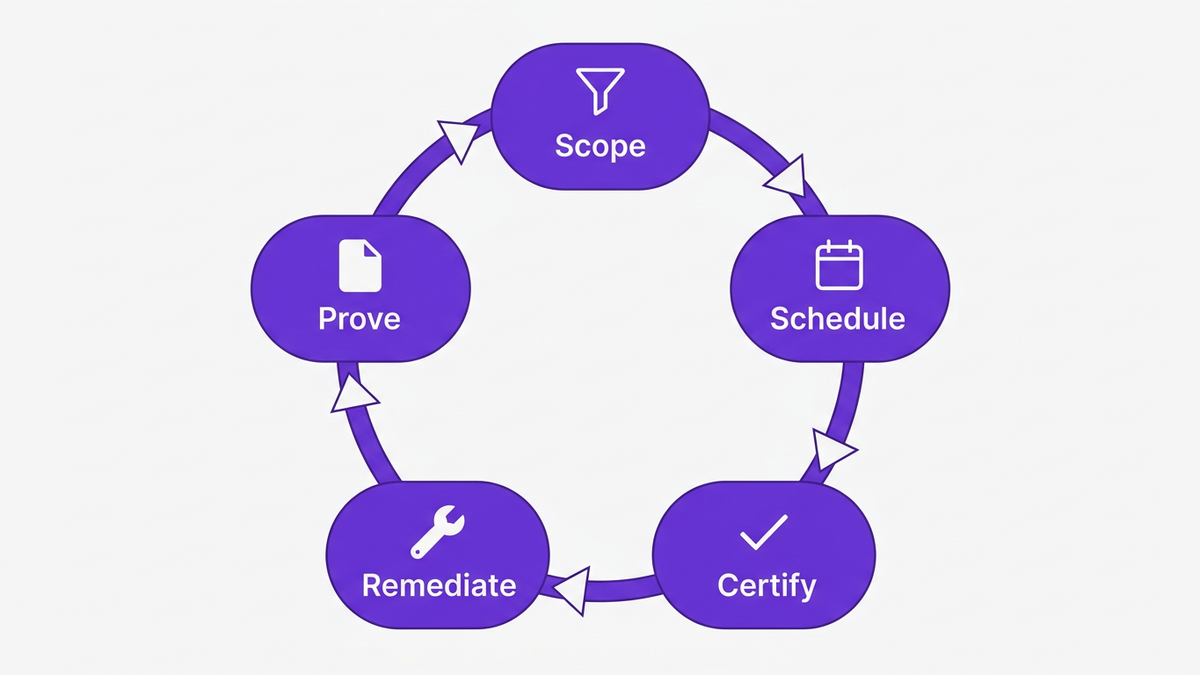
To structure your program, use a simple framework: Scope, Schedule, Certify, Remediate, Prove.
Scope: What apps, identities, and roles are in scope.
Schedule: How often each category is reviewed.
Certify: How owners review and approve or revoke access.
Remediate: How changes are executed and verified.
Prove: How you generate audit-ready documentation.
This framework applies whether you start with one critical SaaS platform or a full enterprise access management program.
This section is your practical UAR execution guide. Treat it as a user access review procedure template that you can adapt to your environment.
The biggest failure mode in access reviews is unclear scope. A 2025 privacy report found that only 41% of organizations include non-human identities such as service accounts and bots in de-provisioning scope, leaving 59% with an audit gap. Start with a structured user permissions audit:
Inventory all SaaS and cloud applications, including shadow IT where possible.
Classify each as low, medium, or high risk based on data sensitivity and regulatory impact.
Identify identity types: employees, contractors, partners, and non-human identities.
Create a simple matrix:
Tier 1: High risk systems and privileged access review accounts, monthly or continuous.
Tier 2: Business critical SaaS, quarterly.
Tier 3: Low risk tools, semiannual or annual.
This matrix becomes the backbone of your periodic user access review procedure.
Every application in scope must have a clearly defined review owner. Typical owners include:
Application owners for business apps
System administrators for infrastructure and platforms
Data owners for specific datasets or domains
Assign owners and document them in your access review procedure. This is critical for audit-ready documentation and for tracking completion SLAs. Counterargument: Some teams keep ownership centralized in IT. This can work in small environments but does not scale in enterprises. Distributed, owner-based reviews are more accurate because business owners understand real-world access needs.
Next, assemble the data that reviewers need. Poor data quality is a top reason reviews stall or produce unreliable results. At minimum, every line item in your user access review process should include:
User identity (including contractor or vendor flags)
Application and account type
Role or permission set
Last login and activity status
Department and manager
Where possible, include cost and license type to support a SaaS governance checklist that covers both risk and spend. This is also where integration with identity and access management (IAM) and SaaS management tools becomes critical. Manual exports from each app do not scale.
Now you are ready to run your first access review workflow. Key actions:
Define review period (for example 30 days for business apps, 15 for privileged accounts).
Notify reviewers and managers of upcoming campaigns and expectations.
Provide clear guidance and a UAR checklist that spells out decision criteria.
A typical UAR checklist for reviewers:
Is the user still active in this role or project?
Does the assigned role reflect least privilege principle?
Are there any duplicate or conflicting roles?
For non-human identities, is the integration or bot still in use?
Set a target SLA. According to a 2026 case summary, one finance company improved its review decision completion rate from 80% to 98% within 30 days after automating this step.
During the campaign, reviewers work through their queues. They should have three primary decisions:
Certify: Access remains appropriate.
Revoke: Access is no longer needed.
Modify: Role or permission should be adjusted.
For privileged access review, require justification notes for any continued admin or elevated privileges. A helpful analogy: treat this like quarterly performance reviews for access rights. You do not keep every project and responsibility forever; you adjust based on current reality.
Decisions without follow-through create a false sense of security. Your access remediation workflow must be tightly linked to the review. Options include:
Direct automation: Decisions trigger changes in connected SaaS or IAM platforms.
Ticket creation: Revokes or modifications create tasks for IT operations.
Change validation: Secondary checks for high-risk changes.
A 2025 federal audit report described how failure to promptly remove privileged access led to repeat findings. After implementing automated UAR processes, subsequent reviews noted a measurable drop in inappropriate access findings. This shows the power of combining review decisions with real IT workflow automation.
Finally, closing the loop requires robust audit-ready documentation. For each campaign, capture:
Scope and systems included
Owners and reviewers
Percentage of accounts reviewed
Decisions made and remediation actions
SLA performance and completion rates
An IAM metrics review in 2026 highlighted that leading organizations track >95% review decision completion within 30 days, and auditors increasingly expect this level of discipline. Over time, use these metrics to refine your user access review procedure and move toward continuous access review for the highest risk areas.

To see this procedure in action, consider a composite case based on 2025 and 2026 audit summaries. A mid-size financial organization relied on spreadsheets and email for its user access review process. Reviews were annual, privileged accounts were in scope only on paper, and non-human identities were ignored. Audit findings included:
Orphaned accounts for former employees
Over-provisioned admin roles
No evidence of consistent SOC2 user access review
After adopting an automated access review workflow through an identity governance platform, the company:
Shifted to quarterly reviews for business apps and monthly reviews for privileged access
Included both human and non-human identities in scope
Improved SLA completion from 80% to 98% within 30 days
Reduced unnecessary privilege assignments by 37%
Counterargument: Some organizations fear that increased review frequency will overload business owners. In practice, automation and well-designed campaigns reduce noise by focusing on high-risk changes and inactive accounts, so reviewers see fewer, more meaningful decisions.
CloudNuro is purpose built to make this user access review procedure executable for modern SaaS and cloud estates. Instead of juggling exports from dozens of apps, IT teams centralize their user access review process flow inside CloudNuro and connect it to existing IAM and IT operations.
CloudNuro provides complete visibility across SaaS and cloud, with a unified inventory of Microsoft 365, Salesforce, and hundreds of other applications. This supports:
Tiered risk classification of applications
Identification of human and non-human identities in each app
A consistent, cross platform user permissions audit
You can align this inventory with best practices from resources such as the complete user access review checklist and identity and access management best practices.
CloudNuro’s Microsoft 365 Custodian and Salesforce Custodian enable periodic user access review procedure campaigns that run on schedules aligned with your risk tiers. Capabilities include:
Rule based campaigns, for example quarterly for business apps, monthly for privileged accounts
Routing to application owners and managers
Inclusion of non-human identities, such as service accounts, bots, and integrations
This addresses a known gap highlighted in 2025 research where 59% of organizations did not include non-human identities in de-provisioning scope.
CloudNuro connects decisions to action. When reviewers certify or revoke access, CloudNuro can:
Trigger changes directly in connected SaaS platforms where supported
Create tasks for it operations teams in existing ticketing tools
Flag high risk changes for additional approval
This combination of governance and automation aligns with a SaaS governance checklist that spans both security and cost control. It also dovetails with CloudNuro’s saas management solution and finops services to optimize license usage and reduce spend.
CloudNuro’s governance first architecture means every campaign, decision, and remediation step is logged with SOC2 ready activity trails. The platform supports:
SLA tracking for review completion and remediation
Dashboards for percentage of accounts reviewed and certified
Exportable reports for SOC2 user access review and other compliance frameworks
This directly supports audit expectations noted by IAM metrics research bodies, where >95% completion within 30 days has become a benchmark.
Even with tools and a strong access review procedure, execution can fail without the right habits. Use these best practices to keep your program effective.
Begin with a focused scope: one or two critical SaaS platforms and their privileged roles. Once your access review workflow is running reliably, expand to more apps and identity types.
Your user access review procedure should not live in isolation. It should complement provisioning, de-provisioning, and authentication controls. Use resources such as identity and access management tools and it security guidance to ensure reviews fit into a broader enterprise access management program.
As research shows, non-human identities remain a frequent blind spot. Include:
API keys and integration accounts
Bots and automation identities
Service accounts in infrastructure and databases
These identities often have broad access and long lifespans. Ignoring them undermines your entire user access review procedure.
Track metrics such as:
Percentage of accounts reviewed per campaign
Time to complete reviews
Time to complete remediation
Use these metrics to adjust campaigns, simplify reviewer workloads, and shift more decisions into automated policies.
User access review is not only about security. It also informs cost optimization and governance for SaaS usage. By combining access data with license and spend analytics, IT teams can:
Retire unused licenses
Right size roles and subscriptions
Support finance teams with accurate cost allocation
This aligns directly with CloudNuro’s FinOps and SaaS governance capabilities.
A user access review procedure is a structured, repeatable process where IT and business owners periodically review and validate user and non-human access to systems. It includes checking who has access, what roles they have, whether those roles are still appropriate, and documenting decisions for compliance.
Periodic reviews are a core control for frameworks such as SOC2 user access review and internal compliance audit requirements. Research indicates that 58% of organizations had user access review in scope for four or more audits in 2025, and 65% experienced fines tied to weak access review processes. Regular reviews demonstrate active control over access, reduce audit findings, and support compliance risk reduction.
Industry guidance and IAM studies suggest quarterly reviews as a baseline for business applications, with monthly or continuous reviews for privileged and high risk systems. From 2024 to 2026, the norm shifted from annual to quarterly access reviews for business apps and monthly for privileged accounts, especially in regulated industries.
A strong UAR checklist should cover:
Verification that the user or non-human identity is still active
Confirmation that roles reflect the least privilege principle
Identification of duplicate or conflicting roles
Justification for any privileged access
Validation that licenses and access tie to real business needs
This gives reviewers clear decision criteria and consistency across campaigns.
Automated access review solutions centralize data, route reviews to the right owners, enforce SLAs, and connect decisions to remediation. Research from 2026 showed organizations improving SLA completion rates from 80% to 98% within 30 days after automating UAR campaigns. Automation also produces better audit-ready documentation and reduces manual, spreadsheet driven work.
A modern user access review procedure is not an annual fire drill. It is a continuous, structured control that protects your organization, satisfies auditors, and improves SaaS governance. By following the Scope, Schedule, Certify, Remediate, Prove framework, and by using automation to support your access review workflow, IT teams can move from reactive, manual reviews to a stable, repeatable program. CloudNuro accelerates this journey with centralized SaaS inventory, automated campaigns, integrated remediation, and audit ready reporting. If your team is ready to modernize user access reviews across SaaS and cloud, CloudNuro can help you operationalize this playbook and align it with broader IT compliance automation and cost optimization goals. About CloudNuro CloudNuro is a leader in Enterprise SaaS Management Platforms, providing enterprises with unmatched visibility, governance, and cost optimization. Recognized twice in a row in the SaaS Management Platforms category and named a Leader in the SoftwareReviews Data Quadrant, CloudNuro is trusted by global enterprises and government agencies to bring financial discipline to SaaS, cloud, and AI. Trusted by enterprises such as Konica Minolta and Federal Signal, CloudNuro provides centralized SaaS inventory, license optimization, and renewal management along with advanced cost allocation and chargeback, giving IT and Finance leaders the visibility, control, and cost-conscious culture needed to drive financial discipline.
Request a no cost, no obligation free assessment —just 15 minutes to savings!
Get Started# The User Access Review Procedure: A Step-by-Step Execution Playbook for IT Teams A rigorous user access review procedure is no longer a compliance nicety. It is a frontline control for stopping privilege creep, orphaned accounts, and silent SaaS sprawl before they show up as audit findings or security incidents. Research from a 2025 compliance survey found that 65% of companies faced fines in the last three years due to weak access review processes. At the same time, an IAM metrics review in 2026 noted that leading enterprises now track review completion SLAs above 95% within 30 days for user access campaigns. This playbook gives IT teams a practical, step-by-step user access review process you can run repeatedly, backed by data, expert guidance, and automation patterns that scale across SaaS and cloud.
A user access review procedure is a formal, repeatable workflow where IT and business owners periodically validate who has access to which systems, what level of access they have, and whether that access is still justified. In practice, it forms the backbone of:
Access governance and least privilege enforcement
Compliance controls such as SOC2 user access review and internal IT security review steps
SaaS security controls for fast growing, cloud-first environments
A 2026 IAM best practices guide notes that quarterly user access reviews are now the baseline for compliance-driven organizations. Another advisory in 2026 highlighted that automating access certification and tracking SLA completion is the single biggest step to reduce risk.
Periodic reviews catch problems that identity and access management (IAM) provisioning workflows miss. Think of it as a scheduled health check for your access controls. Three reasons it matters:
Compliance risk reduction: A 2025 audit report sample showed that 58% of organizations underwent four or more audits in 2025, and user access review was almost always in scope.
Security hygiene: Privilege creep and incomplete de-provisioning remain leading root causes of security incidents.
Cost and SaaS governance: Unused licenses and abandoned SaaS accounts increase spend and expand the attack surface.
Many IT teams still run user access review procedures with spreadsheets, email threads, and ad hoc exports from each application. A 2025 compliance insights report called this manual approach a recognized source of risk and inefficiency. To move from ad hoc to repeatable, you need a consistent access review workflow across your environment.
A 2026 IAM study on review frequency found:
Annual reviews remain for some low-risk business applications
Quarterly reviews dominate for most business systems
Monthly or near continuous reviews are becoming standard for high risk and privileged accounts
This is your north star cadence:
Quarterly user access review procedure for business SaaS, collaboration tools, and productivity platforms.
Monthly or continuous access review procedure for privileged access review, admin roles, and high-risk systems.
To structure your program, use a simple framework: Scope, Schedule, Certify, Remediate, Prove.
Scope: What apps, identities, and roles are in scope.
Schedule: How often each category is reviewed.
Certify: How owners review and approve or revoke access.
Remediate: How changes are executed and verified.
Prove: How you generate audit-ready documentation.
This framework applies whether you start with one critical SaaS platform or a full enterprise access management program.
This section is your practical UAR execution guide. Treat it as a user access review procedure template that you can adapt to your environment.
The biggest failure mode in access reviews is unclear scope. A 2025 privacy report found that only 41% of organizations include non-human identities such as service accounts and bots in de-provisioning scope, leaving 59% with an audit gap. Start with a structured user permissions audit:
Inventory all SaaS and cloud applications, including shadow IT where possible.
Classify each as low, medium, or high risk based on data sensitivity and regulatory impact.
Identify identity types: employees, contractors, partners, and non-human identities.
Create a simple matrix:
Tier 1: High risk systems and privileged access review accounts, monthly or continuous.
Tier 2: Business critical SaaS, quarterly.
Tier 3: Low risk tools, semiannual or annual.
This matrix becomes the backbone of your periodic user access review procedure.
Every application in scope must have a clearly defined review owner. Typical owners include:
Application owners for business apps
System administrators for infrastructure and platforms
Data owners for specific datasets or domains
Assign owners and document them in your access review procedure. This is critical for audit-ready documentation and for tracking completion SLAs. Counterargument: Some teams keep ownership centralized in IT. This can work in small environments but does not scale in enterprises. Distributed, owner-based reviews are more accurate because business owners understand real-world access needs.
Next, assemble the data that reviewers need. Poor data quality is a top reason reviews stall or produce unreliable results. At minimum, every line item in your user access review process should include:
User identity (including contractor or vendor flags)
Application and account type
Role or permission set
Last login and activity status
Department and manager
Where possible, include cost and license type to support a SaaS governance checklist that covers both risk and spend. This is also where integration with identity and access management (IAM) and SaaS management tools becomes critical. Manual exports from each app do not scale.
Now you are ready to run your first access review workflow. Key actions:
Define review period (for example 30 days for business apps, 15 for privileged accounts).
Notify reviewers and managers of upcoming campaigns and expectations.
Provide clear guidance and a UAR checklist that spells out decision criteria.
A typical UAR checklist for reviewers:
Is the user still active in this role or project?
Does the assigned role reflect least privilege principle?
Are there any duplicate or conflicting roles?
For non-human identities, is the integration or bot still in use?
Set a target SLA. According to a 2026 case summary, one finance company improved its review decision completion rate from 80% to 98% within 30 days after automating this step.
During the campaign, reviewers work through their queues. They should have three primary decisions:
Certify: Access remains appropriate.
Revoke: Access is no longer needed.
Modify: Role or permission should be adjusted.
For privileged access review, require justification notes for any continued admin or elevated privileges. A helpful analogy: treat this like quarterly performance reviews for access rights. You do not keep every project and responsibility forever; you adjust based on current reality.
Decisions without follow-through create a false sense of security. Your access remediation workflow must be tightly linked to the review. Options include:
Direct automation: Decisions trigger changes in connected SaaS or IAM platforms.
Ticket creation: Revokes or modifications create tasks for IT operations.
Change validation: Secondary checks for high-risk changes.
A 2025 federal audit report described how failure to promptly remove privileged access led to repeat findings. After implementing automated UAR processes, subsequent reviews noted a measurable drop in inappropriate access findings. This shows the power of combining review decisions with real IT workflow automation.
Finally, closing the loop requires robust audit-ready documentation. For each campaign, capture:
Scope and systems included
Owners and reviewers
Percentage of accounts reviewed
Decisions made and remediation actions
SLA performance and completion rates
An IAM metrics review in 2026 highlighted that leading organizations track >95% review decision completion within 30 days, and auditors increasingly expect this level of discipline. Over time, use these metrics to refine your user access review procedure and move toward continuous access review for the highest risk areas.
To see this procedure in action, consider a composite case based on 2025 and 2026 audit summaries. A mid-size financial organization relied on spreadsheets and email for its user access review process. Reviews were annual, privileged accounts were in scope only on paper, and non-human identities were ignored. Audit findings included:
Orphaned accounts for former employees
Over-provisioned admin roles
No evidence of consistent SOC2 user access review
After adopting an automated access review workflow through an identity governance platform, the company:
Shifted to quarterly reviews for business apps and monthly reviews for privileged access
Included both human and non-human identities in scope
Improved SLA completion from 80% to 98% within 30 days
Reduced unnecessary privilege assignments by 37%
Counterargument: Some organizations fear that increased review frequency will overload business owners. In practice, automation and well-designed campaigns reduce noise by focusing on high-risk changes and inactive accounts, so reviewers see fewer, more meaningful decisions.
CloudNuro is purpose built to make this user access review procedure executable for modern SaaS and cloud estates. Instead of juggling exports from dozens of apps, IT teams centralize their user access review process flow inside CloudNuro and connect it to existing IAM and IT operations.
CloudNuro provides complete visibility across SaaS and cloud, with a unified inventory of Microsoft 365, Salesforce, and hundreds of other applications. This supports:
Tiered risk classification of applications
Identification of human and non-human identities in each app
A consistent, cross platform user permissions audit
You can align this inventory with best practices from resources such as the complete user access review checklist and identity and access management best practices.
CloudNuro’s Microsoft 365 Custodian and Salesforce Custodian enable periodic user access review procedure campaigns that run on schedules aligned with your risk tiers. Capabilities include:
Rule based campaigns, for example quarterly for business apps, monthly for privileged accounts
Routing to application owners and managers
Inclusion of non-human identities, such as service accounts, bots, and integrations
This addresses a known gap highlighted in 2025 research where 59% of organizations did not include non-human identities in de-provisioning scope.
CloudNuro connects decisions to action. When reviewers certify or revoke access, CloudNuro can:
Trigger changes directly in connected SaaS platforms where supported
Create tasks for it operations teams in existing ticketing tools
Flag high risk changes for additional approval
This combination of governance and automation aligns with a SaaS governance checklist that spans both security and cost control. It also dovetails with CloudNuro’s saas management solution and finops services to optimize license usage and reduce spend.
CloudNuro’s governance first architecture means every campaign, decision, and remediation step is logged with SOC2 ready activity trails. The platform supports:
SLA tracking for review completion and remediation
Dashboards for percentage of accounts reviewed and certified
Exportable reports for SOC2 user access review and other compliance frameworks
This directly supports audit expectations noted by IAM metrics research bodies, where >95% completion within 30 days has become a benchmark.
Even with tools and a strong access review procedure, execution can fail without the right habits. Use these best practices to keep your program effective.
Begin with a focused scope: one or two critical SaaS platforms and their privileged roles. Once your access review workflow is running reliably, expand to more apps and identity types.
Your user access review procedure should not live in isolation. It should complement provisioning, de-provisioning, and authentication controls. Use resources such as identity and access management tools and it security guidance to ensure reviews fit into a broader enterprise access management program.
As research shows, non-human identities remain a frequent blind spot. Include:
API keys and integration accounts
Bots and automation identities
Service accounts in infrastructure and databases
These identities often have broad access and long lifespans. Ignoring them undermines your entire user access review procedure.
Track metrics such as:
Percentage of accounts reviewed per campaign
Time to complete reviews
Time to complete remediation
Use these metrics to adjust campaigns, simplify reviewer workloads, and shift more decisions into automated policies.
User access review is not only about security. It also informs cost optimization and governance for SaaS usage. By combining access data with license and spend analytics, IT teams can:
Retire unused licenses
Right size roles and subscriptions
Support finance teams with accurate cost allocation
This aligns directly with CloudNuro’s FinOps and SaaS governance capabilities.
A user access review procedure is a structured, repeatable process where IT and business owners periodically review and validate user and non-human access to systems. It includes checking who has access, what roles they have, whether those roles are still appropriate, and documenting decisions for compliance.
Periodic reviews are a core control for frameworks such as SOC2 user access review and internal compliance audit requirements. Research indicates that 58% of organizations had user access review in scope for four or more audits in 2025, and 65% experienced fines tied to weak access review processes. Regular reviews demonstrate active control over access, reduce audit findings, and support compliance risk reduction.
Industry guidance and IAM studies suggest quarterly reviews as a baseline for business applications, with monthly or continuous reviews for privileged and high risk systems. From 2024 to 2026, the norm shifted from annual to quarterly access reviews for business apps and monthly for privileged accounts, especially in regulated industries.
A strong UAR checklist should cover:
Verification that the user or non-human identity is still active
Confirmation that roles reflect the least privilege principle
Identification of duplicate or conflicting roles
Justification for any privileged access
Validation that licenses and access tie to real business needs
This gives reviewers clear decision criteria and consistency across campaigns.
Automated access review solutions centralize data, route reviews to the right owners, enforce SLAs, and connect decisions to remediation. Research from 2026 showed organizations improving SLA completion rates from 80% to 98% within 30 days after automating UAR campaigns. Automation also produces better audit-ready documentation and reduces manual, spreadsheet driven work.
A modern user access review procedure is not an annual fire drill. It is a continuous, structured control that protects your organization, satisfies auditors, and improves SaaS governance. By following the Scope, Schedule, Certify, Remediate, Prove framework, and by using automation to support your access review workflow, IT teams can move from reactive, manual reviews to a stable, repeatable program. CloudNuro accelerates this journey with centralized SaaS inventory, automated campaigns, integrated remediation, and audit ready reporting. If your team is ready to modernize user access reviews across SaaS and cloud, CloudNuro can help you operationalize this playbook and align it with broader IT compliance automation and cost optimization goals. About CloudNuro CloudNuro is a leader in Enterprise SaaS Management Platforms, providing enterprises with unmatched visibility, governance, and cost optimization. Recognized twice in a row in the SaaS Management Platforms category and named a Leader in the SoftwareReviews Data Quadrant, CloudNuro is trusted by global enterprises and government agencies to bring financial discipline to SaaS, cloud, and AI. Trusted by enterprises such as Konica Minolta and Federal Signal, CloudNuro provides centralized SaaS inventory, license optimization, and renewal management along with advanced cost allocation and chargeback, giving IT and Finance leaders the visibility, control, and cost-conscious culture needed to drive financial discipline.
Request a no cost, no obligation free assessment - just 15 minutes to savings!
Get StartedWe're offering complimentary ServiceNow license assessments to only 25 enterprises this quarter who want to unlock immediate savings without disrupting operations.
Get Free AssessmentGet Started




CloudNuro Corp
1755 Park St. Suite 207
Naperville, IL 60563
Phone : +1-630-277-9470
Email: info@cloudnuro.com





.webp)

Recognized Leader in SaaS Management Platforms by Info-Tech SoftwareReviews


.svg)