

Sign Up
Thank you for Submitting!
AI budget controls are the real-time limits, alerts, and stop actions that keep model and agent spending inside an approved budget while work is still running.
They matter now because 79% of enterprises experienced AI cost overruns in the past 12 months, and 35% only discovered an overrun when the invoice arrived.
This post explains why AI spending runs away, the five layers of control that stop it, and how AgentNuro applies them across every AI tool, model, and agent.
Only 11% of enterprises can forecast their AI costs within 10%. Without AI budget controls, most organizations learn what their models and agents cost a month after the money is gone.
The cause is structural. AI is billed per token and per call, and autonomous agents decide for themselves how many calls to make. A retry loop or an oversized context window can multiply a workload's cost overnight.
CIOs feel it as lost control, CFOs as unforecastable spend, and CISOs as agents acting without limits. Engineering picks the model, IT finds out after the fact, and Finance pays the bill.
Monthly reporting was enough for SaaS seats. It is not enough for consumption that changes by the minute, which is why the discipline of TokenOps for the token economy has moved from visibility to real-time control.
This guide explains how runaway AI spending happens, the layered controls that contain it, and how AgentNuro puts those controls in one place.
Runaway AI spending is consumption that grows faster than anyone approved, usually because no system stops it in time. It has three common sources.
An agent that fails a step may retry, call another tool, and retry again. Each pass consumes tokens, and nothing in the agent itself knows the budget.
98% of enterprises run agentic workloads, yet only 36% include agents in their cost reporting. Spend that is never reported is never governed.
Teams often route simple tasks to the most capable and most expensive model. The quality gain is small and the cost difference compounds with every call.
The business impact is real: 62% of enterprises say an unexpected AI cost materially changed a business decision. For the broader pattern, see why so many companies are already over their AI budget in 2026.
To find where your AI dollars are leaking today, get your free savings assessment.
Effective AI budget controls work as layers. Each layer catches what the one before it missed, and the kill switch is the last line, not the first.
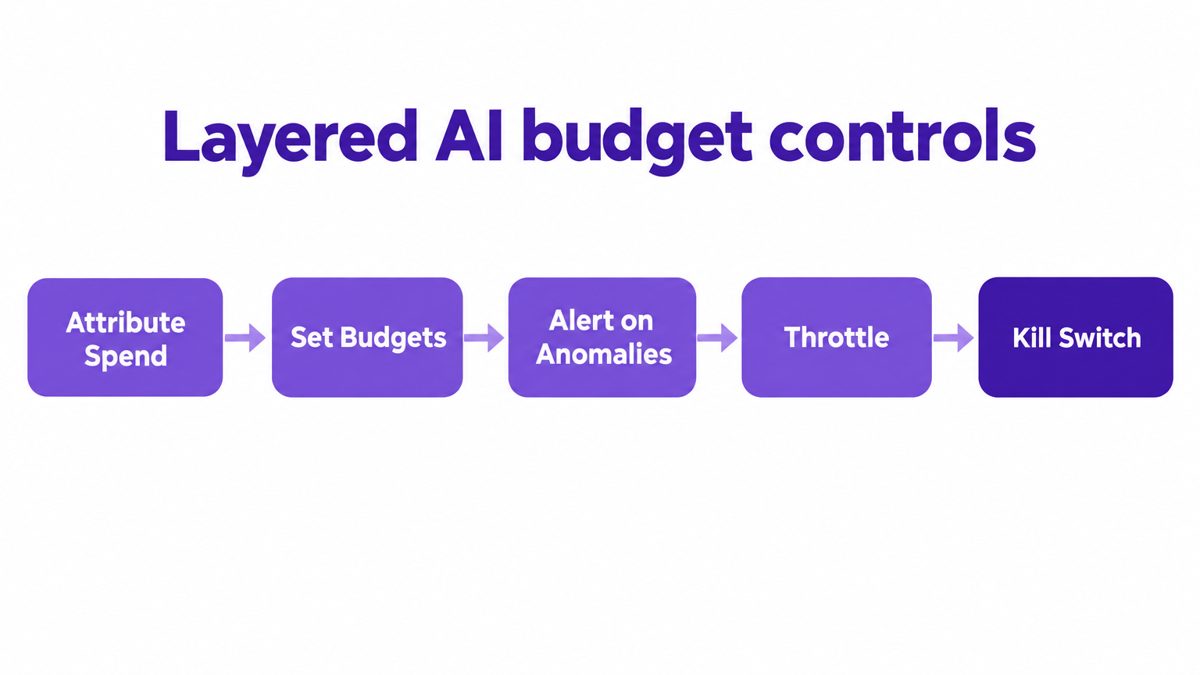
A budget needs an owner. Map every dollar and token to a user, project, model, agent, and business unit, as covered in CloudNuro's guide to tagging and attributing every token.
Department budgets are too coarse to catch one runaway agent. Set limits at the project and individual agent level so a single workload cannot consume a team's quarter.
Anomaly detection flags a spike in consumption against an agent's normal pattern. The owner hears about it in minutes, not at month-end close.
As spend approaches a threshold, slow consumption or redirect work to a lower-cost model. Production keeps running while the cost curve flattens.
A kill switch halts an agent or workload once a hard limit is breached. It belongs to agents that run unattended, where a loop at 2 a.m. would otherwise run until morning.
Pro Tip: Define who can override a kill switch before you need it. An approval path for budget extensions keeps critical workloads moving without removing the limit.
AgentNuro is CloudNuro's Enterprise AI Adoption Management platform. It moves every dollar of AI spend through four stages: discover, attribute, control, and optimize.
AgentNuro finds sanctioned and shadow AI across OpenAI, Claude, Gemini, Copilot, and more. Connection is read-only, nothing changes in your apps, and insights arrive the next day.
Every dollar and token maps to a user, project, model, agent, and business unit. That gives each budget an owner and gives AI spend a denominator for ROI.
AgentNuro applies budget thresholds at the project and agent level and detects anomalous behavior such as runaway agents or unexpected consumption spikes. The AI agent monitoring playbook shows how operators run this day to day.
AgentNuro gives real-time control over the right model for the job, data exposure, token consumption, and runaway spend. Read how this works in AgentNuro Insight vs Control.
AgentNuro is built on CloudNuro's SaaS and cloud FinOps foundation. AI budgets sit next to the app and cloud budgets Finance already governs, in one source of truth.
See how AgentNuro puts real-time limits on AI spend: request a demo.
Run two to four weeks of attribution before enforcing limits, so thresholds reflect real usage. CloudNuro's AgentNuro getting-started guide walks through this sequence.
Experiments get soft alerts. Unattended production agents get hard limits and a kill switch.
Budgets set in isolation drift from plan. Feed attributed usage into AI cost forecasting for tokens, calls, and credits.
A cheap agent that fails its task is waste. Track value per token alongside cost per token, as explained in the AI unit economics blindspot.
Frequent overrides mean a budget is set wrong or a workload has changed. Adjust the limit rather than letting exceptions become the rule.
| Control layer | What it stops | Owner |
|---|---|---|
| Attribute spend | Costs with no owner | FinOps lead |
| Set budgets | One workload consuming a team's budget | CFO, project owner |
| Alert on anomalies | Overruns found at invoice time | AI platform team |
| Throttle | Premium models on simple tasks | Engineering lead |
| Kill switch | Unattended loops and retries | CIO, CISO |
As agents take on more autonomous work, budgets will be enforced at runtime the way access policies are today. Governing agents at scale, as described in CloudNuro's guide to governing AI agents at enterprise scale, will mean every agent carries an owner, a budget, and a stop condition.
CloudNuro delivers results in under 24 hours. Get your free savings assessment.
AI budget controls are limits, alerts, and stop actions that keep spending on AI models and agents within an approved budget in real time. They combine attribution, thresholds, anomaly detection, throttling, and kill switches.
An AI kill switch is a control that halts an agent or workload when it breaches a hard spending limit. It is most useful for unattended agents, where a retry loop can run for hours before anyone notices.
AI agents cause runaway spending because they decide how many model and tool calls to make, and each call is billed. Retries, long contexts, and overpowered models multiply cost without any change in headcount.
Yes, AgentNuro sets budget limits at the project and individual agent level and flags anomalous consumption. Learn more in What Does AgentNuro Do?
AI budget controls slow teams only when limits are set without a baseline. Layered controls alert and throttle first, so most workloads never reach a hard stop.
AgentNuro connects in minutes with read-only access and delivers insights the next day. Nothing changes in your applications.
AI spending now moves at machine speed, and monthly reports cannot catch it. Organizations without AI budget controls will keep discovering overruns on the invoice and cutting AI programs they meant to scale. The better model gives every AI dollar an owner, a limit, and a stop condition, inside one governed view of SaaS, cloud, and AI.
AgentNuro by CloudNuro discovers every AI tool and agent, attributes each dollar to its owner, and applies budget thresholds, anomaly detection, and real-time controls over runaway spend. Together with CloudNuro AI Custodian, it brings AI spend under the same financial discipline as SaaS and cloud.
CloudNuro is a leader in Enterprise AI Adoption Management, providing enterprises with unmatched visibility, governance, and cost optimization. Recognized twice in a row by Gartner in the SaaS Management Platforms and named a Leader in the Info-Tech SoftwareReviews Data Quadrant, CloudNuro is trusted by global enterprises and government agencies to bring financial discipline to SaaS, cloud, and AI. Trusted by enterprises, CloudNuro provides centralized SaaS inventory, license optimization, and renewal management along with advanced cost allocation and chargeback, giving IT and Finance leaders the visibility, control, and cost-conscious culture needed to drive financial discipline.
Request a no cost, no obligation free assessment —just 15 minutes to savings!
Get StartedAI budget controls are the real-time limits, alerts, and stop actions that keep model and agent spending inside an approved budget while work is still running.
They matter now because 79% of enterprises experienced AI cost overruns in the past 12 months, and 35% only discovered an overrun when the invoice arrived.
This post explains why AI spending runs away, the five layers of control that stop it, and how AgentNuro applies them across every AI tool, model, and agent.
Only 11% of enterprises can forecast their AI costs within 10%. Without AI budget controls, most organizations learn what their models and agents cost a month after the money is gone.
The cause is structural. AI is billed per token and per call, and autonomous agents decide for themselves how many calls to make. A retry loop or an oversized context window can multiply a workload's cost overnight.
CIOs feel it as lost control, CFOs as unforecastable spend, and CISOs as agents acting without limits. Engineering picks the model, IT finds out after the fact, and Finance pays the bill.
Monthly reporting was enough for SaaS seats. It is not enough for consumption that changes by the minute, which is why the discipline of TokenOps for the token economy has moved from visibility to real-time control.
This guide explains how runaway AI spending happens, the layered controls that contain it, and how AgentNuro puts those controls in one place.
Runaway AI spending is consumption that grows faster than anyone approved, usually because no system stops it in time. It has three common sources.
An agent that fails a step may retry, call another tool, and retry again. Each pass consumes tokens, and nothing in the agent itself knows the budget.
98% of enterprises run agentic workloads, yet only 36% include agents in their cost reporting. Spend that is never reported is never governed.
Teams often route simple tasks to the most capable and most expensive model. The quality gain is small and the cost difference compounds with every call.
The business impact is real: 62% of enterprises say an unexpected AI cost materially changed a business decision. For the broader pattern, see why so many companies are already over their AI budget in 2026.
To find where your AI dollars are leaking today, get your free savings assessment.
Effective AI budget controls work as layers. Each layer catches what the one before it missed, and the kill switch is the last line, not the first.
A budget needs an owner. Map every dollar and token to a user, project, model, agent, and business unit, as covered in CloudNuro's guide to tagging and attributing every token.
Department budgets are too coarse to catch one runaway agent. Set limits at the project and individual agent level so a single workload cannot consume a team's quarter.
Anomaly detection flags a spike in consumption against an agent's normal pattern. The owner hears about it in minutes, not at month-end close.
As spend approaches a threshold, slow consumption or redirect work to a lower-cost model. Production keeps running while the cost curve flattens.
A kill switch halts an agent or workload once a hard limit is breached. It belongs to agents that run unattended, where a loop at 2 a.m. would otherwise run until morning.
Pro Tip: Define who can override a kill switch before you need it. An approval path for budget extensions keeps critical workloads moving without removing the limit.
AgentNuro is CloudNuro's Enterprise AI Adoption Management platform. It moves every dollar of AI spend through four stages: discover, attribute, control, and optimize.
AgentNuro finds sanctioned and shadow AI across OpenAI, Claude, Gemini, Copilot, and more. Connection is read-only, nothing changes in your apps, and insights arrive the next day.
Every dollar and token maps to a user, project, model, agent, and business unit. That gives each budget an owner and gives AI spend a denominator for ROI.
AgentNuro applies budget thresholds at the project and agent level and detects anomalous behavior such as runaway agents or unexpected consumption spikes. The AI agent monitoring playbook shows how operators run this day to day.
AgentNuro gives real-time control over the right model for the job, data exposure, token consumption, and runaway spend. Read how this works in AgentNuro Insight vs Control.
AgentNuro is built on CloudNuro's SaaS and cloud FinOps foundation. AI budgets sit next to the app and cloud budgets Finance already governs, in one source of truth.
See how AgentNuro puts real-time limits on AI spend: request a demo.
Run two to four weeks of attribution before enforcing limits, so thresholds reflect real usage. CloudNuro's AgentNuro getting-started guide walks through this sequence.
Experiments get soft alerts. Unattended production agents get hard limits and a kill switch.
Budgets set in isolation drift from plan. Feed attributed usage into AI cost forecasting for tokens, calls, and credits.
A cheap agent that fails its task is waste. Track value per token alongside cost per token, as explained in the AI unit economics blindspot.
Frequent overrides mean a budget is set wrong or a workload has changed. Adjust the limit rather than letting exceptions become the rule.
| Control layer | What it stops | Owner |
|---|---|---|
| Attribute spend | Costs with no owner | FinOps lead |
| Set budgets | One workload consuming a team's budget | CFO, project owner |
| Alert on anomalies | Overruns found at invoice time | AI platform team |
| Throttle | Premium models on simple tasks | Engineering lead |
| Kill switch | Unattended loops and retries | CIO, CISO |
As agents take on more autonomous work, budgets will be enforced at runtime the way access policies are today. Governing agents at scale, as described in CloudNuro's guide to governing AI agents at enterprise scale, will mean every agent carries an owner, a budget, and a stop condition.
CloudNuro delivers results in under 24 hours. Get your free savings assessment.
AI budget controls are limits, alerts, and stop actions that keep spending on AI models and agents within an approved budget in real time. They combine attribution, thresholds, anomaly detection, throttling, and kill switches.
An AI kill switch is a control that halts an agent or workload when it breaches a hard spending limit. It is most useful for unattended agents, where a retry loop can run for hours before anyone notices.
AI agents cause runaway spending because they decide how many model and tool calls to make, and each call is billed. Retries, long contexts, and overpowered models multiply cost without any change in headcount.
Yes, AgentNuro sets budget limits at the project and individual agent level and flags anomalous consumption. Learn more in What Does AgentNuro Do?
AI budget controls slow teams only when limits are set without a baseline. Layered controls alert and throttle first, so most workloads never reach a hard stop.
AgentNuro connects in minutes with read-only access and delivers insights the next day. Nothing changes in your applications.
AI spending now moves at machine speed, and monthly reports cannot catch it. Organizations without AI budget controls will keep discovering overruns on the invoice and cutting AI programs they meant to scale. The better model gives every AI dollar an owner, a limit, and a stop condition, inside one governed view of SaaS, cloud, and AI.
AgentNuro by CloudNuro discovers every AI tool and agent, attributes each dollar to its owner, and applies budget thresholds, anomaly detection, and real-time controls over runaway spend. Together with CloudNuro AI Custodian, it brings AI spend under the same financial discipline as SaaS and cloud.
CloudNuro is a leader in Enterprise AI Adoption Management, providing enterprises with unmatched visibility, governance, and cost optimization. Recognized twice in a row by Gartner in the SaaS Management Platforms and named a Leader in the Info-Tech SoftwareReviews Data Quadrant, CloudNuro is trusted by global enterprises and government agencies to bring financial discipline to SaaS, cloud, and AI. Trusted by enterprises, CloudNuro provides centralized SaaS inventory, license optimization, and renewal management along with advanced cost allocation and chargeback, giving IT and Finance leaders the visibility, control, and cost-conscious culture needed to drive financial discipline.
Request a no cost, no obligation free assessment - just 15 minutes to savings!
Get StartedWe're offering complimentary ServiceNow license assessments to only 25 enterprises this quarter who want to unlock immediate savings without disrupting operations.
Get Free AssessmentGet Started




CloudNuro Corp
1755 Park St. Suite 207
Naperville, IL 60563
Phone : +1-630-277-9470
Email: info@cloudnuro.com





.webp)

Recognized Leader in SaaS Management Platforms by Info-Tech SoftwareReviews


.svg)