
Sign Up
Thank you for Submitting!
FOCUS for SaaS means mapping SaaS invoices, cloud bills, and AI usage charges into the FinOps Open Cost and Usage Specification, so one query answers what the enterprise spends on technology.
This guide gives you a column map, a six-step normalization method, and a checklist for assigning every SaaS, cloud, and AI cost an owner.
98% of FinOps teams now manage AI spend, up from 31% two years earlier, and 90% manage SaaS spend or plan to within a year.
The scope of FinOps has moved far past the cloud bill, but the data has not followed. SaaS arrives as annual invoices and seat counts, cloud arrives as hourly line items, and AI arrives as tokens, credits, and per-request charges.
CIOs cannot see the full technology estate, CFOs cannot reconcile it to the general ledger, and FinOps leads cannot answer who owns which cost.
FOCUS for SaaS closes that gap by giving every charge the same columns, whatever its source. It is the data foundation for FinOps that covers SaaS, not just cloud infrastructure.
This guide explains what FOCUS covers for SaaS and AI, maps the columns that matter, and walks through six steps to normalize all three billing streams in one schema.
See how CloudNuro normalizes every technology charge and maps it to an owner and a cost center.
Request a DemoFOCUS for SaaS is the practice of expressing SaaS subscription, usage, and credit charges in the same open billing schema that cloud providers use. Every charge gets the same cost columns, the same charge categories, and the same identifiers, so SaaS, cloud, and AI spend can be summed, compared, and allocated together.
Before FOCUS 1.2, the specification described cloud billing only. Its 1.2 release made the schema applicable to SaaS and PaaS, added support for virtual currencies such as credits and tokens, and added invoice identifiers to each charge.
The value is practical: one dashboard or one SQL query covers the whole technology estate, rather than one export per vendor stitched together in spreadsheets.
| Version | Ratified | What it adds for SaaS and AI |
|---|---|---|
| FOCUS 1.2 | May 29, 2025 | SaaS and PaaS applicability, virtual currencies (credits, tokens), multiple currencies, invoice identifiers on charges |
| FOCUS 1.3 | December 5, 2025 | Contract Commitment dataset, fields for provider-based shared cost splitting, recency and completeness metadata |
| FOCUS 1.4 | June 4, 2026 | Invoice Detail and Billing Period datasets, Contract Commitment expanded from 13 to 30 columns, commitment eligibility for SaaS providers that do not itemize discounts per row |
| FOCUS 1.5 | In progress | Price Sheet, unit and token economics, AI model identity, and input and output token consumption |
Two changes in 1.4 affect any pipeline built earlier. Provider Name and Publisher Name are removed, and Service Provider Name, Host Provider Name, and Invoice Issuer Name now carry those roles.
For AI, the honest position is this: FOCUS can carry token charges as a billable quantity today, but it does not yet standardize which model, agent, or prompt type produced them. That attribution has to come from your own enrichment, as covered in why cloud-era FinOps tools struggle with AI cost.
The table below shows how the same FOCUS columns read for each billing stream. Use it as the starting contract for your normalization layer.
| FOCUS column | SaaS | Cloud | AI |
|---|---|---|---|
| BilledCost | Invoice line amount | Line item after discounts | Monthly API or seat invoice amount |
| EffectiveCost | Annual contract amortized monthly | Commitments amortized across usage | Prepaid credits spread across consumption |
| ListCost / ContractedCost | Public seat price vs negotiated rate | On-demand vs negotiated rate | Published per-token rate vs enterprise rate |
| ChargeCategory | Purchase, Tax, Credit | Usage, Purchase, Adjustment | Usage, Purchase (credit packs) |
| ConsumedQuantity + PricingUnit | Seats, users | Hours, GB, requests | Tokens, credits |
| ServiceCategory | Business application category | Compute, Storage, Databases | AI and Machine Learning |
| InvoiceIssuerName / ServiceProviderName | Reseller vs software vendor | Marketplace vs cloud provider | Cloud marketplace vs model provider |
| Tags (extension) | Department, app owner | Cost center, environment | Model, agent, project, user |
Keep BilledCost and EffectiveCost as separate views. BilledCost reconciles to accounts payable; EffectiveCost drives chargeback and showback and unit economics.
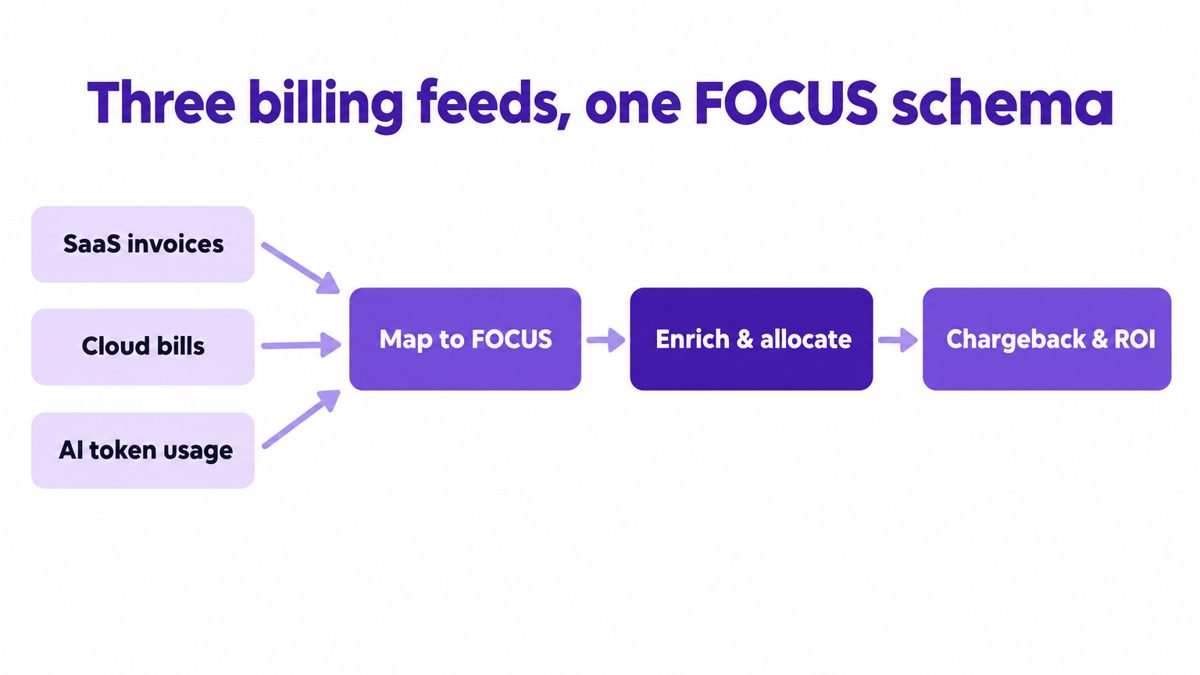
List every place a technology charge originates: cloud cost exports, SaaS invoices in accounts payable, corporate card statements, marketplace bills, and AI API consoles. Card spend matters most, because it is where shadow IT and shadow AI first appear.
You know it worked when: the sum of all sources matches total technology spend in the general ledger for the same month.
Major cloud providers and a growing set of data and developer platforms already publish FOCUS-conformant exports. Ingest these as-is and record which FOCUS version each one follows, since 1.4 renamed the provider columns.
You know it worked when: every native feed lands in one table with a version flag and no provider-specific columns.
Most SaaS vendors still bill by PDF invoice. Convert each invoice line into a FOCUS row: the invoice amount becomes BilledCost, the annual contract amortized by month becomes EffectiveCost, seats become ConsumedQuantity with a PricingUnit of users, and the reseller goes in InvoiceIssuerName.
Then join license utilization data from the identity provider so each seat row carries active or inactive status. That join is what turns a billing schema into license optimization.
You know it worked when: a SaaS application and a cloud service appear in the same report with the same cost columns.
Record AI API charges with tokens or credits as the PricingUnit, using the virtual currency support added in FOCUS 1.2. Record AI seat plans the same way as any SaaS subscription.
Because FOCUS does not yet standardize model identity, add extension tags for model, agent, project, and user. This is the core of TokenOps, and it lets you migrate to native 1.5 columns later without rebuilding reports.
You know it worked when: you can report cost per model and cost per business unit for AI in the same view as SaaS and cloud.
FOCUS standardizes cost, not ownership. Add consistent tags for cost center, application owner, and environment across all three streams, and use the 1.3 shared cost fields to split platform and pooled charges.
You know it worked when: the share of spend with no owner falls month over month and is reported as its own line.
Use the FOCUS 1.4 Invoice Detail and Billing Period datasets to join consumption records to invoices by Invoice ID, so accounts payable and FinOps work from the same billing facts. Then publish showback, and move to chargeback once cost centers trust the numbers, an approach detailed in why most IT chargeback models fail.
You know it worked when: monthly allocated EffectiveCost ties to BilledCost within the same charge period.
Get a free assessment of unused licenses, idle cloud, and unowned AI spend across your estate.
Get Free Savings Assessment| Check | Owner |
|---|---|
| Every billing source listed, including card spend | FinOps lead |
| FOCUS version recorded per feed; 1.4 provider columns handled | Data engineering |
| SaaS contracts amortized into EffectiveCost | Finance |
| Seat rows joined to utilization data | IT asset management |
| AI rows tagged with model, agent, project, user | AI platform lead |
| Cost center on every row; unowned spend reported | FinOps lead |
| Consumption reconciled to invoices monthly | Accounts payable |
For a worked example of FOCUS applied across cloud and on-premises data, see how a hybrid enterprise unified multi-cloud and on-prem data with FOCUS.
Yes. FOCUS supports SaaS billing data from version 1.2, ratified May 29, 2025, which made the schema applicable to SaaS and PaaS charges. Most SaaS vendors do not yet publish native FOCUS exports, so their invoices are mapped into the schema by the customer or a platform.
FOCUS can track AI token costs as a billable quantity, using the virtual currency support for tokens and credits added in 1.2. Native columns for model identity and input and output tokens are in scope for FOCUS 1.5, so teams add their own tags for model and agent today.
BilledCost is the amount invoiced for a charge, while EffectiveCost amortizes upfront and prepaid purchases across the usage they cover. Use BilledCost to reconcile invoices and EffectiveCost for cost allocation and unit economics.
The FOCUS version to implement in 2026 is 1.4 where your sources support it, because it adds invoice reconciliation and ships zero incompatible changes. Plan for the removal of Provider Name and Publisher Name if your pipeline was built on 1.2.
FOCUS supplies the consistent cost data that cost allocation and chargeback need, plus shared cost split fields from 1.3, but it does not assign owners. Ownership comes from tags and allocation rules, which the chargeback vs showback guide explains in detail.
CloudNuro brings SaaS, cloud, and AI spend into one normalized view through 250+ integrations, then maps every cost to an owner and a cost center. Its AI layer, AgentNuro, maps every AI dollar and token to a user, project, model, agent, and business unit.
FOCUS for SaaS has turned a cloud billing standard into a common language for the whole technology estate. Organizations that keep SaaS, cloud, and AI in separate exports will keep reconciling by spreadsheet and arguing over who owns each cost.
The better model normalizes every charge into one schema, enriches it with ownership, and gives Finance, IT, and AI leaders one view they all trust.
See how AgentNuro attributes AI spend by model, agent, and business unit alongside SaaS and cloud.
Request a DemoCloudNuro unifies SaaS management and cloud FinOps in one platform, so SaaS invoices and cloud bills land in the same cost model with automated cost allocation and chargeback.
AgentNuro extends that foundation to AI: it discovers sanctioned and shadow AI with read-only connections, maps every dollar and token to a user, project, model, agent, and business unit, and applies real-time controls on models, budgets, and token consumption. Teams that need hands-on help building the practice can add CloudNuro's FinOps services.
CloudNuro is a leader in Enterprise AI Adoption Management, providing enterprises with unmatched visibility, governance, and cost optimization. Recognized twice in a row by Gartner in the SaaS Management Platforms and named a Leader in the Info-Tech SoftwareReviews Data Quadrant, CloudNuro is trusted by global enterprises and government agencies to bring financial discipline to SaaS, cloud, and AI. Trusted by enterprises, CloudNuro provides centralized SaaS inventory, license optimization, and renewal management along with advanced cost allocation and chargeback, giving IT and Finance leaders the visibility, control, and cost-conscious culture needed to drive financial discipline.
Request a no cost, no obligation free assessment —just 15 minutes to savings!
Get StartedFOCUS for SaaS means mapping SaaS invoices, cloud bills, and AI usage charges into the FinOps Open Cost and Usage Specification, so one query answers what the enterprise spends on technology.
This guide gives you a column map, a six-step normalization method, and a checklist for assigning every SaaS, cloud, and AI cost an owner.
98% of FinOps teams now manage AI spend, up from 31% two years earlier, and 90% manage SaaS spend or plan to within a year.
The scope of FinOps has moved far past the cloud bill, but the data has not followed. SaaS arrives as annual invoices and seat counts, cloud arrives as hourly line items, and AI arrives as tokens, credits, and per-request charges.
CIOs cannot see the full technology estate, CFOs cannot reconcile it to the general ledger, and FinOps leads cannot answer who owns which cost.
FOCUS for SaaS closes that gap by giving every charge the same columns, whatever its source. It is the data foundation for FinOps that covers SaaS, not just cloud infrastructure.
This guide explains what FOCUS covers for SaaS and AI, maps the columns that matter, and walks through six steps to normalize all three billing streams in one schema.
See how CloudNuro normalizes every technology charge and maps it to an owner and a cost center.
Request a DemoFOCUS for SaaS is the practice of expressing SaaS subscription, usage, and credit charges in the same open billing schema that cloud providers use. Every charge gets the same cost columns, the same charge categories, and the same identifiers, so SaaS, cloud, and AI spend can be summed, compared, and allocated together.
Before FOCUS 1.2, the specification described cloud billing only. Its 1.2 release made the schema applicable to SaaS and PaaS, added support for virtual currencies such as credits and tokens, and added invoice identifiers to each charge.
The value is practical: one dashboard or one SQL query covers the whole technology estate, rather than one export per vendor stitched together in spreadsheets.
| Version | Ratified | What it adds for SaaS and AI |
|---|---|---|
| FOCUS 1.2 | May 29, 2025 | SaaS and PaaS applicability, virtual currencies (credits, tokens), multiple currencies, invoice identifiers on charges |
| FOCUS 1.3 | December 5, 2025 | Contract Commitment dataset, fields for provider-based shared cost splitting, recency and completeness metadata |
| FOCUS 1.4 | June 4, 2026 | Invoice Detail and Billing Period datasets, Contract Commitment expanded from 13 to 30 columns, commitment eligibility for SaaS providers that do not itemize discounts per row |
| FOCUS 1.5 | In progress | Price Sheet, unit and token economics, AI model identity, and input and output token consumption |
Two changes in 1.4 affect any pipeline built earlier. Provider Name and Publisher Name are removed, and Service Provider Name, Host Provider Name, and Invoice Issuer Name now carry those roles.
For AI, the honest position is this: FOCUS can carry token charges as a billable quantity today, but it does not yet standardize which model, agent, or prompt type produced them. That attribution has to come from your own enrichment, as covered in why cloud-era FinOps tools struggle with AI cost.
The table below shows how the same FOCUS columns read for each billing stream. Use it as the starting contract for your normalization layer.
| FOCUS column | SaaS | Cloud | AI |
|---|---|---|---|
| BilledCost | Invoice line amount | Line item after discounts | Monthly API or seat invoice amount |
| EffectiveCost | Annual contract amortized monthly | Commitments amortized across usage | Prepaid credits spread across consumption |
| ListCost / ContractedCost | Public seat price vs negotiated rate | On-demand vs negotiated rate | Published per-token rate vs enterprise rate |
| ChargeCategory | Purchase, Tax, Credit | Usage, Purchase, Adjustment | Usage, Purchase (credit packs) |
| ConsumedQuantity + PricingUnit | Seats, users | Hours, GB, requests | Tokens, credits |
| ServiceCategory | Business application category | Compute, Storage, Databases | AI and Machine Learning |
| InvoiceIssuerName / ServiceProviderName | Reseller vs software vendor | Marketplace vs cloud provider | Cloud marketplace vs model provider |
| Tags (extension) | Department, app owner | Cost center, environment | Model, agent, project, user |
Keep BilledCost and EffectiveCost as separate views. BilledCost reconciles to accounts payable; EffectiveCost drives chargeback and showback and unit economics.
List every place a technology charge originates: cloud cost exports, SaaS invoices in accounts payable, corporate card statements, marketplace bills, and AI API consoles. Card spend matters most, because it is where shadow IT and shadow AI first appear.
You know it worked when: the sum of all sources matches total technology spend in the general ledger for the same month.
Major cloud providers and a growing set of data and developer platforms already publish FOCUS-conformant exports. Ingest these as-is and record which FOCUS version each one follows, since 1.4 renamed the provider columns.
You know it worked when: every native feed lands in one table with a version flag and no provider-specific columns.
Most SaaS vendors still bill by PDF invoice. Convert each invoice line into a FOCUS row: the invoice amount becomes BilledCost, the annual contract amortized by month becomes EffectiveCost, seats become ConsumedQuantity with a PricingUnit of users, and the reseller goes in InvoiceIssuerName.
Then join license utilization data from the identity provider so each seat row carries active or inactive status. That join is what turns a billing schema into license optimization.
You know it worked when: a SaaS application and a cloud service appear in the same report with the same cost columns.
Record AI API charges with tokens or credits as the PricingUnit, using the virtual currency support added in FOCUS 1.2. Record AI seat plans the same way as any SaaS subscription.
Because FOCUS does not yet standardize model identity, add extension tags for model, agent, project, and user. This is the core of TokenOps, and it lets you migrate to native 1.5 columns later without rebuilding reports.
You know it worked when: you can report cost per model and cost per business unit for AI in the same view as SaaS and cloud.
FOCUS standardizes cost, not ownership. Add consistent tags for cost center, application owner, and environment across all three streams, and use the 1.3 shared cost fields to split platform and pooled charges.
You know it worked when: the share of spend with no owner falls month over month and is reported as its own line.
Use the FOCUS 1.4 Invoice Detail and Billing Period datasets to join consumption records to invoices by Invoice ID, so accounts payable and FinOps work from the same billing facts. Then publish showback, and move to chargeback once cost centers trust the numbers, an approach detailed in why most IT chargeback models fail.
You know it worked when: monthly allocated EffectiveCost ties to BilledCost within the same charge period.
Get a free assessment of unused licenses, idle cloud, and unowned AI spend across your estate.
Get Free Savings Assessment| Check | Owner |
|---|---|
| Every billing source listed, including card spend | FinOps lead |
| FOCUS version recorded per feed; 1.4 provider columns handled | Data engineering |
| SaaS contracts amortized into EffectiveCost | Finance |
| Seat rows joined to utilization data | IT asset management |
| AI rows tagged with model, agent, project, user | AI platform lead |
| Cost center on every row; unowned spend reported | FinOps lead |
| Consumption reconciled to invoices monthly | Accounts payable |
For a worked example of FOCUS applied across cloud and on-premises data, see how a hybrid enterprise unified multi-cloud and on-prem data with FOCUS.
Yes. FOCUS supports SaaS billing data from version 1.2, ratified May 29, 2025, which made the schema applicable to SaaS and PaaS charges. Most SaaS vendors do not yet publish native FOCUS exports, so their invoices are mapped into the schema by the customer or a platform.
FOCUS can track AI token costs as a billable quantity, using the virtual currency support for tokens and credits added in 1.2. Native columns for model identity and input and output tokens are in scope for FOCUS 1.5, so teams add their own tags for model and agent today.
BilledCost is the amount invoiced for a charge, while EffectiveCost amortizes upfront and prepaid purchases across the usage they cover. Use BilledCost to reconcile invoices and EffectiveCost for cost allocation and unit economics.
The FOCUS version to implement in 2026 is 1.4 where your sources support it, because it adds invoice reconciliation and ships zero incompatible changes. Plan for the removal of Provider Name and Publisher Name if your pipeline was built on 1.2.
FOCUS supplies the consistent cost data that cost allocation and chargeback need, plus shared cost split fields from 1.3, but it does not assign owners. Ownership comes from tags and allocation rules, which the chargeback vs showback guide explains in detail.
CloudNuro brings SaaS, cloud, and AI spend into one normalized view through 250+ integrations, then maps every cost to an owner and a cost center. Its AI layer, AgentNuro, maps every AI dollar and token to a user, project, model, agent, and business unit.
FOCUS for SaaS has turned a cloud billing standard into a common language for the whole technology estate. Organizations that keep SaaS, cloud, and AI in separate exports will keep reconciling by spreadsheet and arguing over who owns each cost.
The better model normalizes every charge into one schema, enriches it with ownership, and gives Finance, IT, and AI leaders one view they all trust.
See how AgentNuro attributes AI spend by model, agent, and business unit alongside SaaS and cloud.
Request a DemoCloudNuro unifies SaaS management and cloud FinOps in one platform, so SaaS invoices and cloud bills land in the same cost model with automated cost allocation and chargeback.
AgentNuro extends that foundation to AI: it discovers sanctioned and shadow AI with read-only connections, maps every dollar and token to a user, project, model, agent, and business unit, and applies real-time controls on models, budgets, and token consumption. Teams that need hands-on help building the practice can add CloudNuro's FinOps services.
CloudNuro is a leader in Enterprise AI Adoption Management, providing enterprises with unmatched visibility, governance, and cost optimization. Recognized twice in a row by Gartner in the SaaS Management Platforms and named a Leader in the Info-Tech SoftwareReviews Data Quadrant, CloudNuro is trusted by global enterprises and government agencies to bring financial discipline to SaaS, cloud, and AI. Trusted by enterprises, CloudNuro provides centralized SaaS inventory, license optimization, and renewal management along with advanced cost allocation and chargeback, giving IT and Finance leaders the visibility, control, and cost-conscious culture needed to drive financial discipline.
Request a no cost, no obligation free assessment - just 15 minutes to savings!
Get StartedWe're offering complimentary ServiceNow license assessments to only 25 enterprises this quarter who want to unlock immediate savings without disrupting operations.
Get Free AssessmentGet Started




CloudNuro Corp
1755 Park St. Suite 207
Naperville, IL 60563
Phone : +1-630-277-9470
Email: info@cloudnuro.com







Recognized Leader in SaaS Management Platforms by Info-Tech SoftwareReviews