

Sign Up
Thank you for Submitting!
For IT, security, and finance leaders, the "Microsoft 365 E3 vs E5 cost comparison" question is no longer academic. The E5 plan costs about $21 more per user per month than E3, a roughly 61% uplift over the E3 price of $34 per user per month (Microsoft, 2026). At scale, that premium can add millions in annual spend.
Yet 81% of enterprises with regulated data have already upgraded to E5 for built-in advanced security and compliance features (Gartner, 2026). So, when is that premium a smart investment, and when is it overkill your auditors or board will question?
This guide gives you a practical decision framework, grounded in data, that you can use to evaluate Microsoft 365 E3 vs E5 for your own environment and risk profile.
Before going deep, you need a clear mental model. Think of E3 as the productivity and baseline security suite, and E5 as productivity plus integrated advanced security, compliance, and analytics.
On a pure pricing basis:
That 61% uplift is the anchor for any Microsoft 365 E3 vs E5 price comparison. The right question is not "Is Microsoft 365 E5 expensive?" but "Can we generate more than $21 per user per month in avoided risk, de-duplicated tools, and productivity gains?"
High level, the Microsoft 365 E3 vs E5 cost per user gap buys you:
Put differently, E3 is your baseline office and collaboration license, while E5 is also a security and compliance platform license.
This is why 71% of organizations cite cost, compliance, and staff productivity as the top three drivers for E5 upgrades (IDC, 2026).
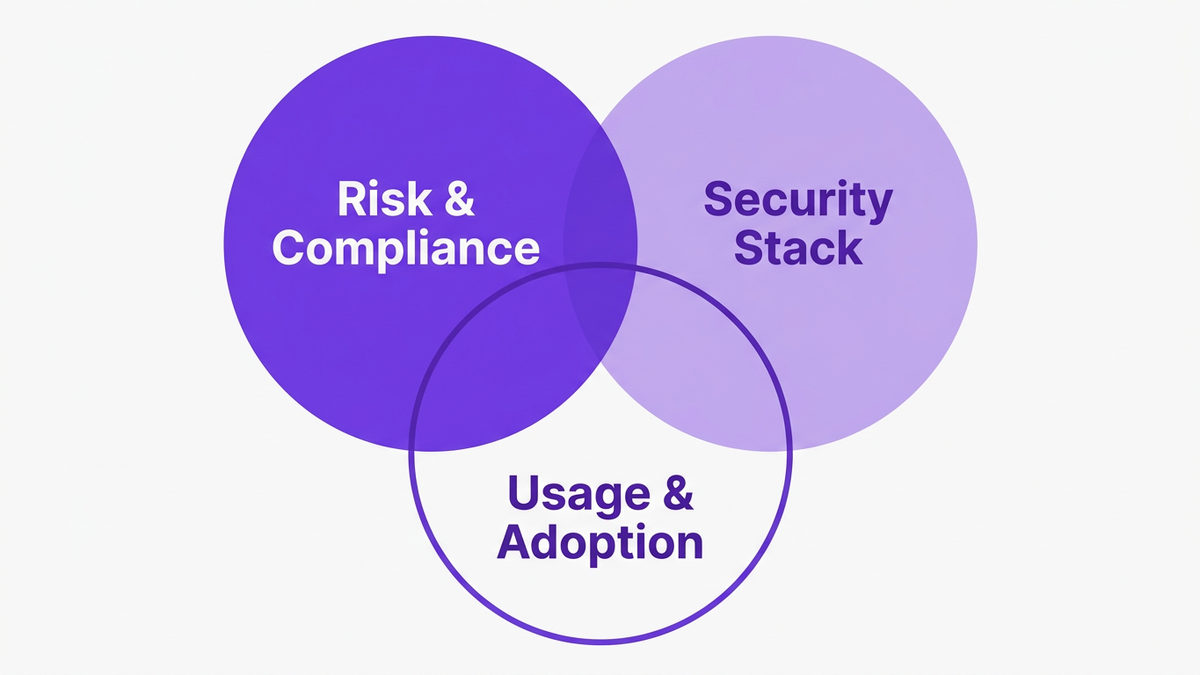
To keep the "Microsoft 365 E5 is it worth it" conversation focused, use a three-lens model:
Think of it like evaluating a premium insurance policy. For a small household, maximum coverage might be overkill. For a high-value asset or complex operation, insufficient coverage is the real risk.
Ask:
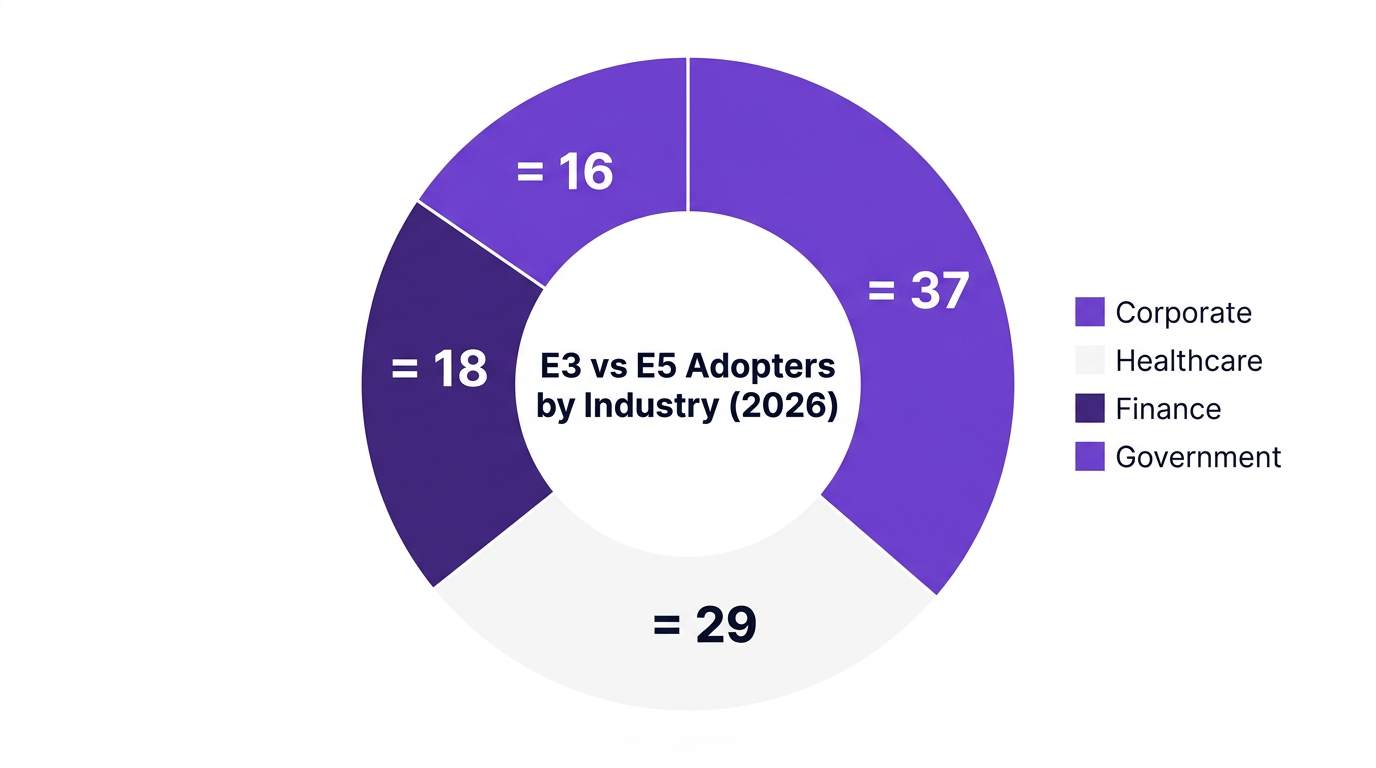
Adoption data reflects this. In regulated sectors, 47% of new Microsoft 365 seats now opt for E5 licensing (Gartner, 2026). A separate analysis found 81% of enterprises with regulated data have moved to E5 mainly for built-in security and compliance (Gartner, 2026).
If you answer "yes" across this lens, Microsoft 365 E3 limitations around advanced data protection and investigation can quickly become a board-level concern.
For many enterprises, the real Microsoft 365 E3 vs E5 total cost of ownership question is:
"Is Microsoft 365 E5 worth the extra cost if we can drop or downsize several third-party tools?"
Research suggests this can be compelling:
If your E3 environment is surrounded by email security, DLP, CASB, SIEM, and advanced endpoint tools from multiple vendors, an honest Microsoft 365 e5 vs third party security stack cost analysis may reveal duplication.
This is where many E5 business cases fall down. IDC found that 71% of organizations upgrading cited productivity as a driver, yet a large subset only activated a fraction of E5 capabilities for most users.
Key questions:
If not, an E5 rollout can turn into an expensive shelfware project. This is precisely where scenario modeling and AI-driven usage analytics become essential.

The most consequential differences in any m365 E3 vs E5 comparison relate to security and compliance. These are also the hardest benefits to quantify, which is why many enterprises rely on generic assumptions instead of real data.
In the Microsoft Defender E5 vs E3 debate, it helps to group value into three buckets:
A study of organizations moving from E3 to E5 found that 61% justified the license switch primarily through reduced incident response costs (Forrester, 2026). Faster detection, fewer manual escalations, and integrated threat intelligence played a major role.
From a Purview E5 vs E3 standpoint, the delta typically shows up in:
For regulated industries, the business case often hinges on avoiding fines, reputational damage, and remediation costs rather than pure license ROI. One healthcare provider with 12,000 employees that migrated from E3 to E5 saw:
For them, the question "is Microsoft 365 E5 worth the extra cost" was answered by measurable risk reduction and simplified compliance.

Very few enterprises should treat Microsoft 365 E3 vs E5 for business as a binary choice. The most efficient models are often hybrid, with a mix of E3 and E5 tailored to roles, risk, and usage.
This is where scenario modeling and m365 FinOps practices become decisive.
Deloitte found that enterprises using scenario modeling tools for Microsoft license optimization saved an average of $297,000 per year (Deloitte, 2026). McKinsey reports that 35% of organizations moving from E3 to E5 used AI-driven analytics to simulate cost-to-value impact before license tier changes (McKinsey, 2026).
Common scenarios to simulate:
This type of m365 license tier comparison often reveals that Microsoft 365 E3 vs E5 for 500 users is a different story than for 10,000 users. The optimal blend depends on your org structure and risk distribution.
To stay balanced, consider counterexamples where E3 remains the better choice:
In these situations, the microsoft 365 e5 cost justification often fails when scrutinized by finance. The more pragmatic path is to remain on E3, rationalize overlapping tools, and invest in SaaS cost optimization for Microsoft 365 and other platforms.
For additional tactics here, see guidance such as reduce Microsoft 365 costs or more advanced strategies like stop wasting Microsoft 365 licenses.
If you already run E5, the question often flips to "what do you lose going from E5 to E3?" This is not just a feature list issue, it is a governance and risk conversation.
Broadly, downgrading from E5 to E3 can mean losing:
The risk is not only exposure. You can also strand operational processes that depend on E5-only features.
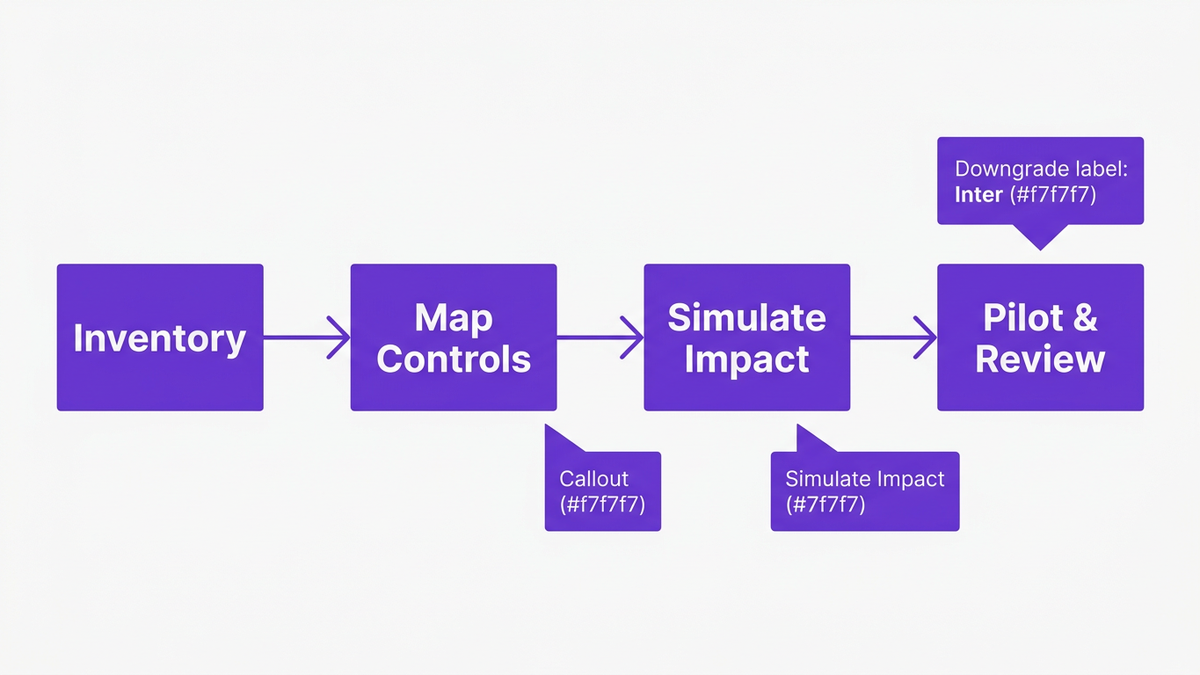
If you are considering an E5 to E3 move, follow a structured approach:
This is a classic case where microsoft 365 e3 vs e5 total cost of ownership must incorporate risk exposure and internal process disruption, not just license line items.
For many enterprises, especially those in microsoft 365 e3 vs e5 regulated industries, a full downgrade is rarely advisable. A targeted hybrid model can preserve critical capabilities for sensitive roles while reducing overall E5 footprint.
Most organizations struggle not because they lack data, but because their data is fragmented across security tools, finance systems, and admin portals. CloudNuro is designed to close this gap for Microsoft 365 and the broader SaaS estate.
CloudNuro brings three core capabilities to the microsoft 365 e3 vs e5 cost comparison problem: license analytics, scenario modeling, and governance automation.
CloudNuro’s Microsoft 365 Custodian connects directly to your Microsoft 365 APIs to deliver:
Enterprises using similar scenario modeling approaches have reported average annual savings of $297,000 from license optimization (Deloitte, 2026). CloudNuro operationalizes this with real-time decision support, not static spreadsheets.
To go deeper on this theme, explore CloudNuro’s guidance on Microsoft license optimization and specialized FinOps services.
Many organizations decide on m365 e3 vs e5 for security and compliance in isolation, separate from other SaaS and cloud decisions. CloudNuro’s AI Custodian provides a unified view that shows:
This supports a more rigorous comparison of microsoft 365 e5 vs third party security stack cost, grounded in your actual events and usage patterns.
CloudNuro’s FinOps Services team works with CIO, CISO, and finance stakeholders to:
One large financial services firm, using scenario modeling and license analytics, justified an E3 to E5 upgrade for 4,000 of 15,000 users, resulting in a net reduction of $410,000 in projected annual SaaS security spend (Gartner, 2026). CloudNuro’s capabilities are built to replicate this type of outcome for a broader range of enterprises.
For organizations seeking a broader SaaS control plane, CloudNuro’s SaaS management and IT asset management solutions extend these practices beyond Microsoft 365 into the full cloud ecosystem.

Microsoft 365 E5 is worth the extra cost when you can monetize the additional $21/user/month through reduced third-party security spend, lower incident response costs, and avoided compliance risk. Data shows 22% average reduction in third-party security spend and significant incident response savings for E5 adopters (Forrester, 2026).
For lightly regulated or low-risk organizations, E3 combined with targeted third-party tools and strong governance may be more cost effective.
E3 provides the core productivity, collaboration, and baseline security stack. E5 adds advanced security, compliance, analytics, and telephony capabilities.
The most financially impactful differences are in security and compliance: extended threat protection, advanced DLP, richer eDiscovery, and integrated investigation tools. These are central to microsoft 365 e3 vs e5 security value assessments.
Upgrade makes the most sense for:
Often, a partial E3 to E5 upgrade for high-risk users and departments is more cost effective than a full migration.
You lose access to a range of advanced security, compliance, and analytics features, including richer threat hunting, insider risk management, advanced eDiscovery, and deeper audit capabilities.
These losses can impact incident response times, regulatory readiness, and forensic investigations, so any downgrade should include a structured impact assessment and pilot phase.
There is no universal answer, but studies show average 22% savings in third-party security spend for E5 adopters (Forrester, 2026). The key is to map E5’s capabilities against your existing tools, then calculate which can be removed or downgraded.
CloudNuro’s Microsoft 365 Custodian and AI Custodian help you perform this comparison using actual utilization, incident, and cost data rather than estimates.
For e3 vs e5 for mid sized business, the same three lenses apply: risk, tooling, and usage. Mid sized organizations often benefit from a small E5 footprint for high-risk roles, while keeping most users on E3.
AI-driven microsoft 365 license optimization and scenario modeling can reveal tipping points where expanding E5 becomes cheaper than maintaining multiple third-party tools.
The right Microsoft 365 E3 vs E5 cost comparison is less about winning an E3 vs E5 debate, and more about building a defensible, data-backed decision that aligns security, compliance, and cost.
Use this sequence:
CloudNuro helps you move from guesswork to governance, giving you the analytics and automation needed to optimize Microsoft 365 and your broader SaaS estate.
If you are planning a Microsoft 365 review, now is the time to formalize your approach to m365 FinOps and SaaS governance.
Ready to build a data-driven E3/E5 strategy?
Request a CloudNuro demo to see how AI-driven license analytics and scenario modeling can improve your Microsoft 365 ROI.
CloudNuro is a leader in Enterprise SaaS Management Platforms, providing enterprises with unmatched visibility, governance, and cost optimization. Recognized twice in a row in the SaaS Management Platforms category and named a Leader in the SoftwareReviews Data Quadrant, CloudNuro is trusted by global enterprises and government agencies to bring financial discipline to SaaS, cloud, and AI. Trusted by enterprises such as Konica Minolta and Federal Signal, CloudNuro provides centralized SaaS inventory, license optimization, and renewal management along with advanced cost allocation and chargeback, giving IT and Finance leaders the visibility, control, and cost-conscious culture needed to drive financial discipline.
Request a no cost, no obligation free assessment —just 15 minutes to savings!
Get StartedFor IT, security, and finance leaders, the "Microsoft 365 E3 vs E5 cost comparison" question is no longer academic. The E5 plan costs about $21 more per user per month than E3, a roughly 61% uplift over the E3 price of $34 per user per month (Microsoft, 2026). At scale, that premium can add millions in annual spend.
Yet 81% of enterprises with regulated data have already upgraded to E5 for built-in advanced security and compliance features (Gartner, 2026). So, when is that premium a smart investment, and when is it overkill your auditors or board will question?
This guide gives you a practical decision framework, grounded in data, that you can use to evaluate Microsoft 365 E3 vs E5 for your own environment and risk profile.
Before going deep, you need a clear mental model. Think of E3 as the productivity and baseline security suite, and E5 as productivity plus integrated advanced security, compliance, and analytics.
On a pure pricing basis:
That 61% uplift is the anchor for any Microsoft 365 E3 vs E5 price comparison. The right question is not "Is Microsoft 365 E5 expensive?" but "Can we generate more than $21 per user per month in avoided risk, de-duplicated tools, and productivity gains?"
High level, the Microsoft 365 E3 vs E5 cost per user gap buys you:
Put differently, E3 is your baseline office and collaboration license, while E5 is also a security and compliance platform license.
This is why 71% of organizations cite cost, compliance, and staff productivity as the top three drivers for E5 upgrades (IDC, 2026).
To keep the "Microsoft 365 E5 is it worth it" conversation focused, use a three-lens model:
Think of it like evaluating a premium insurance policy. For a small household, maximum coverage might be overkill. For a high-value asset or complex operation, insufficient coverage is the real risk.
Ask:
Adoption data reflects this. In regulated sectors, 47% of new Microsoft 365 seats now opt for E5 licensing (Gartner, 2026). A separate analysis found 81% of enterprises with regulated data have moved to E5 mainly for built-in security and compliance (Gartner, 2026).
If you answer "yes" across this lens, Microsoft 365 E3 limitations around advanced data protection and investigation can quickly become a board-level concern.
For many enterprises, the real Microsoft 365 E3 vs E5 total cost of ownership question is:
"Is Microsoft 365 E5 worth the extra cost if we can drop or downsize several third-party tools?"
Research suggests this can be compelling:
If your E3 environment is surrounded by email security, DLP, CASB, SIEM, and advanced endpoint tools from multiple vendors, an honest Microsoft 365 e5 vs third party security stack cost analysis may reveal duplication.
This is where many E5 business cases fall down. IDC found that 71% of organizations upgrading cited productivity as a driver, yet a large subset only activated a fraction of E5 capabilities for most users.
Key questions:
If not, an E5 rollout can turn into an expensive shelfware project. This is precisely where scenario modeling and AI-driven usage analytics become essential.
The most consequential differences in any m365 E3 vs E5 comparison relate to security and compliance. These are also the hardest benefits to quantify, which is why many enterprises rely on generic assumptions instead of real data.
In the Microsoft Defender E5 vs E3 debate, it helps to group value into three buckets:
A study of organizations moving from E3 to E5 found that 61% justified the license switch primarily through reduced incident response costs (Forrester, 2026). Faster detection, fewer manual escalations, and integrated threat intelligence played a major role.
From a Purview E5 vs E3 standpoint, the delta typically shows up in:
For regulated industries, the business case often hinges on avoiding fines, reputational damage, and remediation costs rather than pure license ROI. One healthcare provider with 12,000 employees that migrated from E3 to E5 saw:
For them, the question "is Microsoft 365 E5 worth the extra cost" was answered by measurable risk reduction and simplified compliance.
Very few enterprises should treat Microsoft 365 E3 vs E5 for business as a binary choice. The most efficient models are often hybrid, with a mix of E3 and E5 tailored to roles, risk, and usage.
This is where scenario modeling and m365 FinOps practices become decisive.
Deloitte found that enterprises using scenario modeling tools for Microsoft license optimization saved an average of $297,000 per year (Deloitte, 2026). McKinsey reports that 35% of organizations moving from E3 to E5 used AI-driven analytics to simulate cost-to-value impact before license tier changes (McKinsey, 2026).
Common scenarios to simulate:
This type of m365 license tier comparison often reveals that Microsoft 365 E3 vs E5 for 500 users is a different story than for 10,000 users. The optimal blend depends on your org structure and risk distribution.
To stay balanced, consider counterexamples where E3 remains the better choice:
In these situations, the microsoft 365 e5 cost justification often fails when scrutinized by finance. The more pragmatic path is to remain on E3, rationalize overlapping tools, and invest in SaaS cost optimization for Microsoft 365 and other platforms.
For additional tactics here, see guidance such as reduce Microsoft 365 costs or more advanced strategies like stop wasting Microsoft 365 licenses.
If you already run E5, the question often flips to "what do you lose going from E5 to E3?" This is not just a feature list issue, it is a governance and risk conversation.
Broadly, downgrading from E5 to E3 can mean losing:
The risk is not only exposure. You can also strand operational processes that depend on E5-only features.
If you are considering an E5 to E3 move, follow a structured approach:
This is a classic case where microsoft 365 e3 vs e5 total cost of ownership must incorporate risk exposure and internal process disruption, not just license line items.
For many enterprises, especially those in microsoft 365 e3 vs e5 regulated industries, a full downgrade is rarely advisable. A targeted hybrid model can preserve critical capabilities for sensitive roles while reducing overall E5 footprint.
Most organizations struggle not because they lack data, but because their data is fragmented across security tools, finance systems, and admin portals. CloudNuro is designed to close this gap for Microsoft 365 and the broader SaaS estate.
CloudNuro brings three core capabilities to the microsoft 365 e3 vs e5 cost comparison problem: license analytics, scenario modeling, and governance automation.
CloudNuro’s Microsoft 365 Custodian connects directly to your Microsoft 365 APIs to deliver:
Enterprises using similar scenario modeling approaches have reported average annual savings of $297,000 from license optimization (Deloitte, 2026). CloudNuro operationalizes this with real-time decision support, not static spreadsheets.
To go deeper on this theme, explore CloudNuro’s guidance on Microsoft license optimization and specialized FinOps services.
Many organizations decide on m365 e3 vs e5 for security and compliance in isolation, separate from other SaaS and cloud decisions. CloudNuro’s AI Custodian provides a unified view that shows:
This supports a more rigorous comparison of microsoft 365 e5 vs third party security stack cost, grounded in your actual events and usage patterns.
CloudNuro’s FinOps Services team works with CIO, CISO, and finance stakeholders to:
One large financial services firm, using scenario modeling and license analytics, justified an E3 to E5 upgrade for 4,000 of 15,000 users, resulting in a net reduction of $410,000 in projected annual SaaS security spend (Gartner, 2026). CloudNuro’s capabilities are built to replicate this type of outcome for a broader range of enterprises.
For organizations seeking a broader SaaS control plane, CloudNuro’s SaaS management and IT asset management solutions extend these practices beyond Microsoft 365 into the full cloud ecosystem.
Microsoft 365 E5 is worth the extra cost when you can monetize the additional $21/user/month through reduced third-party security spend, lower incident response costs, and avoided compliance risk. Data shows 22% average reduction in third-party security spend and significant incident response savings for E5 adopters (Forrester, 2026).
For lightly regulated or low-risk organizations, E3 combined with targeted third-party tools and strong governance may be more cost effective.
E3 provides the core productivity, collaboration, and baseline security stack. E5 adds advanced security, compliance, analytics, and telephony capabilities.
The most financially impactful differences are in security and compliance: extended threat protection, advanced DLP, richer eDiscovery, and integrated investigation tools. These are central to microsoft 365 e3 vs e5 security value assessments.
Upgrade makes the most sense for:
Often, a partial E3 to E5 upgrade for high-risk users and departments is more cost effective than a full migration.
You lose access to a range of advanced security, compliance, and analytics features, including richer threat hunting, insider risk management, advanced eDiscovery, and deeper audit capabilities.
These losses can impact incident response times, regulatory readiness, and forensic investigations, so any downgrade should include a structured impact assessment and pilot phase.
There is no universal answer, but studies show average 22% savings in third-party security spend for E5 adopters (Forrester, 2026). The key is to map E5’s capabilities against your existing tools, then calculate which can be removed or downgraded.
CloudNuro’s Microsoft 365 Custodian and AI Custodian help you perform this comparison using actual utilization, incident, and cost data rather than estimates.
For e3 vs e5 for mid sized business, the same three lenses apply: risk, tooling, and usage. Mid sized organizations often benefit from a small E5 footprint for high-risk roles, while keeping most users on E3.
AI-driven microsoft 365 license optimization and scenario modeling can reveal tipping points where expanding E5 becomes cheaper than maintaining multiple third-party tools.
The right Microsoft 365 E3 vs E5 cost comparison is less about winning an E3 vs E5 debate, and more about building a defensible, data-backed decision that aligns security, compliance, and cost.
Use this sequence:
CloudNuro helps you move from guesswork to governance, giving you the analytics and automation needed to optimize Microsoft 365 and your broader SaaS estate.
If you are planning a Microsoft 365 review, now is the time to formalize your approach to m365 FinOps and SaaS governance.
Ready to build a data-driven E3/E5 strategy?
Request a CloudNuro demo to see how AI-driven license analytics and scenario modeling can improve your Microsoft 365 ROI.
CloudNuro is a leader in Enterprise SaaS Management Platforms, providing enterprises with unmatched visibility, governance, and cost optimization. Recognized twice in a row in the SaaS Management Platforms category and named a Leader in the SoftwareReviews Data Quadrant, CloudNuro is trusted by global enterprises and government agencies to bring financial discipline to SaaS, cloud, and AI. Trusted by enterprises such as Konica Minolta and Federal Signal, CloudNuro provides centralized SaaS inventory, license optimization, and renewal management along with advanced cost allocation and chargeback, giving IT and Finance leaders the visibility, control, and cost-conscious culture needed to drive financial discipline.
Request a no cost, no obligation free assessment - just 15 minutes to savings!
Get StartedWe're offering complimentary ServiceNow license assessments to only 25 enterprises this quarter who want to unlock immediate savings without disrupting operations.
Get Free AssessmentGet Started




CloudNuro Corp
1755 Park St. Suite 207
Naperville, IL 60563
Phone : +1-630-277-9470
Email: info@cloudnuro.com





.webp)

Recognized Leader in SaaS Management Platforms by Info-Tech SoftwareReviews
.png)



.svg)