
Sign Up
Thank you for Submitting!

AVD license management is the practice of matching every Azure Virtual Desktop user to exactly one eligible entitlement, and removing that entitlement when the user stops connecting.
Waste in Azure Virtual Desktop rarely comes from one big mistake: it comes from duplicate entitlements, legacy RDS CALs, over-tiered users, and licenses that stay assigned after access ends.
This guide gives IT and Finance a six-step process, a copyable checklist, and the mistakes to remove before the next Microsoft true-up.
Azure Virtual Desktop has no license of its own for internal users: access rights arrive through Microsoft 365, Windows Enterprise, or VDA entitlements, and through RDS CALs when session hosts run Windows Server.
That design keeps AVD flexible, but it also means AVD license management is spread across the Microsoft 365 admin center, Microsoft Entra ID, the Azure portal, and procurement records.
CIOs see a desktop platform, CFOs see a Microsoft bill, and IT asset managers see license counts that never line up with active sessions.
The fix is a repeatable assignment model that ties each entitlement to a user, a session host type, and real connection activity, the same discipline covered in CloudNuro's guide to license management software.
This guide explains which licenses grant AVD rights, walks through six assignment steps, and shows how to avoid the mistakes that keep idle licenses on the books.
Get a license waste audit that maps every Microsoft entitlement to a user, an owner, and a cost center.
Get Free Savings AssessmentEligible AVD access depends on two things: whether the user is internal or external, and which operating system the session host runs.
| Scenario | Licenses that grant access | Common waste |
|---|---|---|
| Internal users, Windows 10/11 Enterprise or multi-session hosts | Microsoft 365 E3, E5, F3, Business Premium, A3/A5; Windows Enterprise E3/E5; Windows VDA per user | Buying a separate Windows Enterprise or VDA license for users already covered by Microsoft 365 E3 or E5 |
| Internal users, Windows Server session hosts | RDS CAL with active Software Assurance (per user or per device), or RDS User Subscription License | Keeping RDS CALs after migrating hosts to Windows 11 multi-session |
| External commercial users (customers, partners) | AVD per-user access pricing on an enrolled Azure subscription, Windows client hosts only | Paying per-user access for people who already hold an internal entitlement |
| Users on Office 365 only, Business Basic or Standard, or E1 | No AVD access rights from these plans | Users connecting without a valid entitlement, creating compliance exposure |
Per-user access pricing does not include Office apps, security tools, Intune, or the Azure compute, storage, and networking behind each session host. Those costs are separate and belong in your FinOps practice.
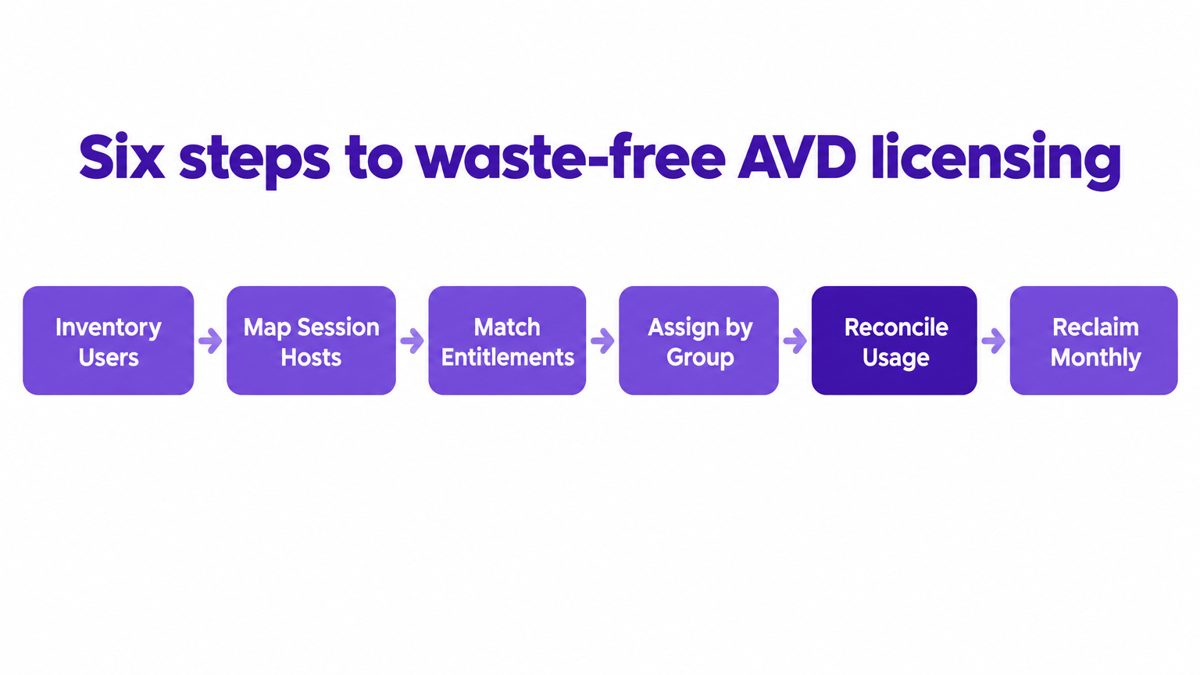
Export the users and groups assigned to each AVD application group, then join that list to HR status and department.
You know it worked when every AVD user has an owner, a cost center, and an employment status.
Record whether each host pool runs Windows 10/11 Enterprise multi-session or Windows Server, because that choice decides between Microsoft 365 entitlements and RDS CALs.
You know it worked when every host pool carries a host OS tag and every user maps to at least one pool.
Check what each user already holds before buying anything: a Microsoft 365 E3 or E5 user already has Windows Enterprise rights, so a separate VDA license is duplication.
For tier decisions, CloudNuro's E3 vs E5 cost comparison shows when the higher tier earns its premium. Frontline and occasional users may fit F3 where its feature set covers the work.
Group-based licensing in Microsoft Entra ID ties the license to membership, so joiners inherit it and leavers lose it without a ticket.
Align the license group with the AVD application group, so access and entitlement change together. CloudNuro's guide to license reclaim workflows on day 30, 60, and 90 shows how to automate the lifecycle around it.
Compare assigned entitlements with AVD sign-in and session data every month. A user licensed for AVD who has not connected in a full cycle is a reclaim candidate.
The same signals apply to the wider tenant, as covered in five signals for finding inactive Microsoft 365 users.
Remove idle users from the license group, retire RDS CALs no longer tied to Windows Server hosts, and stop external per-user charges for users who now hold an internal entitlement.
For scripted removal, see how to reclaim unused M365 licenses with PowerShell. Then report reclaimed entitlements by cost center through chargeback and showback.
| Check | Owner | Frequency |
|---|---|---|
| Every AVD user has one eligible entitlement, no duplicates | IT asset management | Monthly |
| Host pool OS tagged; RDS CALs only for Windows Server hosts | Cloud operations | Quarterly |
| Licenses assigned by Entra group, not directly | Identity team | Monthly |
| Users with no AVD sessions in 30 days flagged | IT operations | Monthly |
| External per-user access charges reconciled with internal licenses | FinOps | Monthly |
| Reclaimed entitlements reported by cost center | Finance | Quarterly |
See how CloudNuro ties Microsoft entitlements to owners, cost centers, and activity in one view.
Request a DemoUsers with Microsoft 365 E3 or E5 who also receive a Windows Enterprise or VDA license are paid for twice.
Solution: Run a duplicate entitlement check before every renewal.
Teams that move from Windows Server RDS to Windows 11 multi-session often keep paying Software Assurance on CALs nobody needs.
Solution: Retire CALs once no Windows Server host pool remains.
Giving occasional desktop users E5 because it is the default adds premium cost without premium use.
Solution: Tier users by role and activity, following Microsoft 365 license management best practices.
Office 365-only plans, Business Basic, Business Standard, and E1 carry no AVD rights, so users on them create compliance exposure.
Solution: Block AVD application group membership for users without an eligible license group.
AVD license management is the process of assigning, tracking, and reclaiming the Microsoft entitlements that grant Azure Virtual Desktop access. It covers Microsoft 365, Windows Enterprise, VDA, RDS CALs, and external per-user access pricing.
Microsoft 365 E3, E5, F3, Business Premium, and A3/A5, plus Windows Enterprise E3/E5 and Windows VDA per user, grant AVD rights for Windows 10/11 Enterprise hosts. Office 365-only plans, Business Basic, Business Standard, and E1 do not.
RDS CALs are needed for AVD only when session hosts run Windows Server. Windows 10/11 Enterprise multi-session hosts use the user's Microsoft 365 or Windows entitlement instead.
AVD per-user access pricing is for external commercial users, such as customers or partners, connecting to Windows client session hosts. It requires an enrolled Azure subscription and does not apply to Windows Server hosts or internal employees.
Unused AVD licenses show up when you compare entitlement assignments with AVD session and sign-in activity. CloudNuro's IT asset management capabilities bring license and usage data into one view for that reconciliation.
AVD licenses should be reconciled monthly against activity, with a deeper review before each Microsoft renewal or true-up. Monthly cycles stop idle licenses from carrying into the next contract term.
Azure Virtual Desktop spreads entitlements across Microsoft 365, Windows, RDS, and Azure billing, so waste accumulates quietly between renewals.
Organizations that assign once and never reconcile keep paying for duplicate rights, retired CALs, and departed users.
The better model gives every entitlement an owner, a cost center, and a usage signal, inside one governed view of SaaS, cloud, and AI.
Get a free savings assessment covering AVD, Microsoft 365, and the rest of your SaaS estate.
Get Free Savings AssessmentCloudNuro brings Microsoft 365 license data, identity groups, and usage activity into one platform, so IT can see which AVD users hold duplicate or idle entitlements.
Its SaaS management and chargeback capabilities then assign every reclaimed license and remaining cost to an owner and a cost center, with 250+ integrations and SOC 2 Type II security.
CloudNuro is a leader in Enterprise AI Adoption Management, providing enterprises with unmatched visibility, governance, and cost optimization. Recognized twice in a row by Gartner in the SaaS Management Platforms and named a Leader in the Info-Tech SoftwareReviews Data Quadrant, CloudNuro is trusted by global enterprises and government agencies to bring financial discipline to SaaS, cloud, and AI. Trusted by enterprises, CloudNuro provides centralized SaaS inventory, license optimization, and renewal management along with advanced cost allocation and chargeback, giving IT and Finance leaders the visibility, control, and cost-conscious culture needed to drive financial discipline.
Request a no cost, no obligation free assessment —just 15 minutes to savings!
Get StartedAVD license management is the practice of matching every Azure Virtual Desktop user to exactly one eligible entitlement, and removing that entitlement when the user stops connecting.
Waste in Azure Virtual Desktop rarely comes from one big mistake: it comes from duplicate entitlements, legacy RDS CALs, over-tiered users, and licenses that stay assigned after access ends.
This guide gives IT and Finance a six-step process, a copyable checklist, and the mistakes to remove before the next Microsoft true-up.
Azure Virtual Desktop has no license of its own for internal users: access rights arrive through Microsoft 365, Windows Enterprise, or VDA entitlements, and through RDS CALs when session hosts run Windows Server.
That design keeps AVD flexible, but it also means AVD license management is spread across the Microsoft 365 admin center, Microsoft Entra ID, the Azure portal, and procurement records.
CIOs see a desktop platform, CFOs see a Microsoft bill, and IT asset managers see license counts that never line up with active sessions.
The fix is a repeatable assignment model that ties each entitlement to a user, a session host type, and real connection activity, the same discipline covered in CloudNuro's guide to license management software.
This guide explains which licenses grant AVD rights, walks through six assignment steps, and shows how to avoid the mistakes that keep idle licenses on the books.
Get a license waste audit that maps every Microsoft entitlement to a user, an owner, and a cost center.
Get Free Savings AssessmentEligible AVD access depends on two things: whether the user is internal or external, and which operating system the session host runs.
| Scenario | Licenses that grant access | Common waste |
|---|---|---|
| Internal users, Windows 10/11 Enterprise or multi-session hosts | Microsoft 365 E3, E5, F3, Business Premium, A3/A5; Windows Enterprise E3/E5; Windows VDA per user | Buying a separate Windows Enterprise or VDA license for users already covered by Microsoft 365 E3 or E5 |
| Internal users, Windows Server session hosts | RDS CAL with active Software Assurance (per user or per device), or RDS User Subscription License | Keeping RDS CALs after migrating hosts to Windows 11 multi-session |
| External commercial users (customers, partners) | AVD per-user access pricing on an enrolled Azure subscription, Windows client hosts only | Paying per-user access for people who already hold an internal entitlement |
| Users on Office 365 only, Business Basic or Standard, or E1 | No AVD access rights from these plans | Users connecting without a valid entitlement, creating compliance exposure |
Per-user access pricing does not include Office apps, security tools, Intune, or the Azure compute, storage, and networking behind each session host. Those costs are separate and belong in your FinOps practice.
Export the users and groups assigned to each AVD application group, then join that list to HR status and department.
You know it worked when every AVD user has an owner, a cost center, and an employment status.
Record whether each host pool runs Windows 10/11 Enterprise multi-session or Windows Server, because that choice decides between Microsoft 365 entitlements and RDS CALs.
You know it worked when every host pool carries a host OS tag and every user maps to at least one pool.
Check what each user already holds before buying anything: a Microsoft 365 E3 or E5 user already has Windows Enterprise rights, so a separate VDA license is duplication.
For tier decisions, CloudNuro's E3 vs E5 cost comparison shows when the higher tier earns its premium. Frontline and occasional users may fit F3 where its feature set covers the work.
Group-based licensing in Microsoft Entra ID ties the license to membership, so joiners inherit it and leavers lose it without a ticket.
Align the license group with the AVD application group, so access and entitlement change together. CloudNuro's guide to license reclaim workflows on day 30, 60, and 90 shows how to automate the lifecycle around it.
Compare assigned entitlements with AVD sign-in and session data every month. A user licensed for AVD who has not connected in a full cycle is a reclaim candidate.
The same signals apply to the wider tenant, as covered in five signals for finding inactive Microsoft 365 users.
Remove idle users from the license group, retire RDS CALs no longer tied to Windows Server hosts, and stop external per-user charges for users who now hold an internal entitlement.
For scripted removal, see how to reclaim unused M365 licenses with PowerShell. Then report reclaimed entitlements by cost center through chargeback and showback.
| Check | Owner | Frequency |
|---|---|---|
| Every AVD user has one eligible entitlement, no duplicates | IT asset management | Monthly |
| Host pool OS tagged; RDS CALs only for Windows Server hosts | Cloud operations | Quarterly |
| Licenses assigned by Entra group, not directly | Identity team | Monthly |
| Users with no AVD sessions in 30 days flagged | IT operations | Monthly |
| External per-user access charges reconciled with internal licenses | FinOps | Monthly |
| Reclaimed entitlements reported by cost center | Finance | Quarterly |
See how CloudNuro ties Microsoft entitlements to owners, cost centers, and activity in one view.
Request a DemoUsers with Microsoft 365 E3 or E5 who also receive a Windows Enterprise or VDA license are paid for twice.
Solution: Run a duplicate entitlement check before every renewal.
Teams that move from Windows Server RDS to Windows 11 multi-session often keep paying Software Assurance on CALs nobody needs.
Solution: Retire CALs once no Windows Server host pool remains.
Giving occasional desktop users E5 because it is the default adds premium cost without premium use.
Solution: Tier users by role and activity, following Microsoft 365 license management best practices.
Office 365-only plans, Business Basic, Business Standard, and E1 carry no AVD rights, so users on them create compliance exposure.
Solution: Block AVD application group membership for users without an eligible license group.
AVD license management is the process of assigning, tracking, and reclaiming the Microsoft entitlements that grant Azure Virtual Desktop access. It covers Microsoft 365, Windows Enterprise, VDA, RDS CALs, and external per-user access pricing.
Microsoft 365 E3, E5, F3, Business Premium, and A3/A5, plus Windows Enterprise E3/E5 and Windows VDA per user, grant AVD rights for Windows 10/11 Enterprise hosts. Office 365-only plans, Business Basic, Business Standard, and E1 do not.
RDS CALs are needed for AVD only when session hosts run Windows Server. Windows 10/11 Enterprise multi-session hosts use the user's Microsoft 365 or Windows entitlement instead.
AVD per-user access pricing is for external commercial users, such as customers or partners, connecting to Windows client session hosts. It requires an enrolled Azure subscription and does not apply to Windows Server hosts or internal employees.
Unused AVD licenses show up when you compare entitlement assignments with AVD session and sign-in activity. CloudNuro's IT asset management capabilities bring license and usage data into one view for that reconciliation.
AVD licenses should be reconciled monthly against activity, with a deeper review before each Microsoft renewal or true-up. Monthly cycles stop idle licenses from carrying into the next contract term.
Azure Virtual Desktop spreads entitlements across Microsoft 365, Windows, RDS, and Azure billing, so waste accumulates quietly between renewals.
Organizations that assign once and never reconcile keep paying for duplicate rights, retired CALs, and departed users.
The better model gives every entitlement an owner, a cost center, and a usage signal, inside one governed view of SaaS, cloud, and AI.
Get a free savings assessment covering AVD, Microsoft 365, and the rest of your SaaS estate.
Get Free Savings AssessmentCloudNuro brings Microsoft 365 license data, identity groups, and usage activity into one platform, so IT can see which AVD users hold duplicate or idle entitlements.
Its SaaS management and chargeback capabilities then assign every reclaimed license and remaining cost to an owner and a cost center, with 250+ integrations and SOC 2 Type II security.
CloudNuro is a leader in Enterprise AI Adoption Management, providing enterprises with unmatched visibility, governance, and cost optimization. Recognized twice in a row by Gartner in the SaaS Management Platforms and named a Leader in the Info-Tech SoftwareReviews Data Quadrant, CloudNuro is trusted by global enterprises and government agencies to bring financial discipline to SaaS, cloud, and AI. Trusted by enterprises, CloudNuro provides centralized SaaS inventory, license optimization, and renewal management along with advanced cost allocation and chargeback, giving IT and Finance leaders the visibility, control, and cost-conscious culture needed to drive financial discipline.
Request a no cost, no obligation free assessment - just 15 minutes to savings!
Get StartedWe're offering complimentary ServiceNow license assessments to only 25 enterprises this quarter who want to unlock immediate savings without disrupting operations.
Get Free AssessmentGet Started




CloudNuro Corp
1755 Park St. Suite 207
Naperville, IL 60563
Phone : +1-630-277-9470
Email: info@cloudnuro.com







Recognized Leader in SaaS Management Platforms by Info-Tech SoftwareReviews