

Sign Up
Thank you for Submitting!
Runaway AI agents are autonomous workflows that keep calling models and tools after the useful work has stopped, and every extra call is billed.
Agentic workloads consume roughly 5 to 30 times more tokens than standard chatbot interactions, and infinite tool calls and retry loops push that multiple far higher.
This post explains how loops form, why they stay invisible on the monthly invoice, and the runtime controls that stop them before they reach your AI budget.
Agentic AI workloads consume roughly 5 to 30 times more tokens than standard chatbot interactions. That multiple comes from reasoning loops, tool calls, retries, and agents handing work to other agents.
Runaway AI agents turn that multiple into an open-ended bill. A chatbot answers once and stops. An agent decides for itself how many times to call a model, query a tool, or try again, and nothing in the model API sets a ceiling.
Task-specific agents are moving into 40% of enterprise applications by the end of 2026, up from fewer than 5% in 2025. More agents means more loops, and more loops means spend that no one forecast.
CFOs see the overrun a month late. CIOs cannot say which agent caused it. AI leaders cannot tell a loop from a legitimate workload. This is why TokenOps as a FinOps practice for the token economy now sits next to cloud and SaaS cost management.
This post explains how infinite tool calls and retry loops form, what they cost, and how AgentNuro detects and stops them in real time.
See how AgentNuro maps every token to a user, project, model, and agent.
Request a DemoA runaway AI agent is an agent that keeps executing model and tool calls without making progress toward its goal. It is usually caused by a tool failure, an ambiguous success condition, or two agents passing the same task back and forth.
The agent is not malfunctioning in the usual sense. It is doing what it was built to do: plan, act, check the result, and try again. The cost problem is that each step is billed and no step is free.
An agent calls a search, database, or API tool, gets an empty or malformed result, and calls it again with nearly identical arguments. Each call also sends the result back through the model, so the token bill grows with every pass.
When an agent retries, it typically resends the original prompt, its prior reasoning, and every tool result collected so far. The tenth attempt costs far more than the first because the context window has grown at every step.
Agents built to critique and revise their own output make extra model calls even when the first answer was usable. Without a stop rule, the revise step can repeat indefinitely.
In multi-agent systems, a planner hands work to a worker, the worker returns it as incomplete, and the planner hands it back. Each agent may retrieve the same records and resend the same context, doubling token and tool costs per cycle.
The cost of a loop compounds because every iteration carries the full history of the iterations before it. In one documented comparison, a naive 10-step agent loop used 472,500 input tokens, while a single-pass workflow for the same job used 9,000.
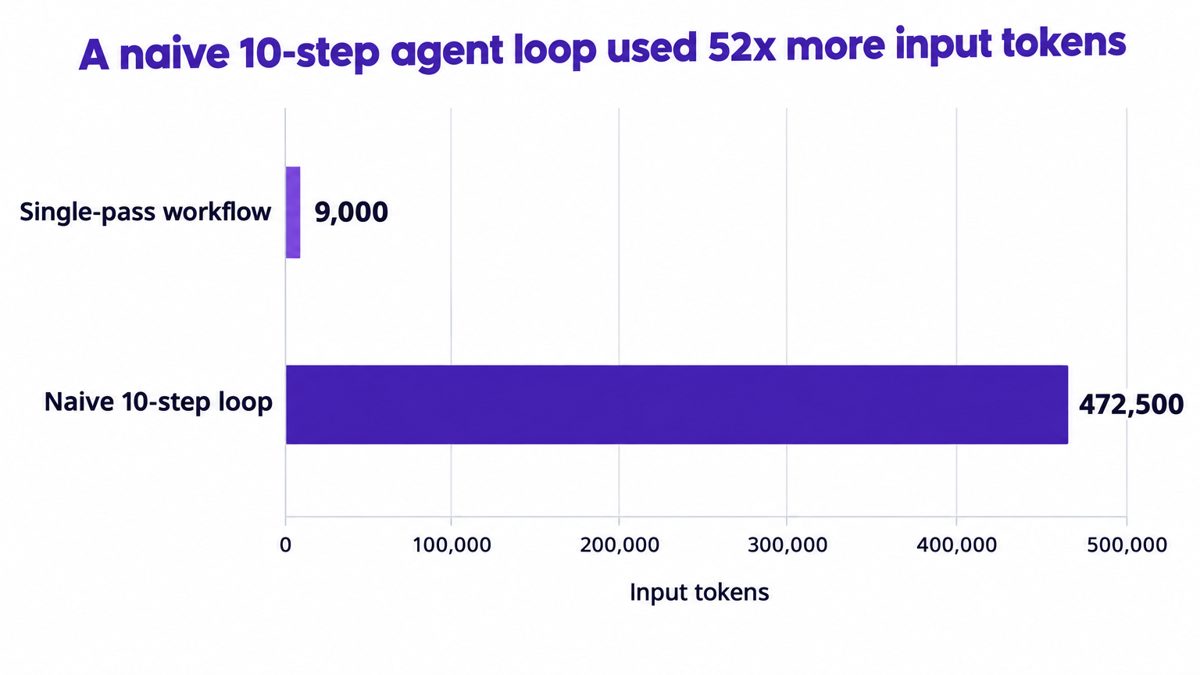
Input tokens consumed by the same task run as a single pass and as a naive 10-step agent loop.
That is roughly 52 times the input tokens for one task. Multiply it across thousands of daily runs and a workflow that looked affordable in a pilot becomes a material line item in production.
The per-interaction view tells the same story. A simple linear workflow that cost about $0.04 per interaction in 2023 can cost about $1.20 in 2026 once tools, reasoning, subagents, and iterative loops are added.
This is why measuring cost per successful AI task matters more than cost per token. A loop that burns 50 calls and fails still shows a low price per token.
Runaway loops stay invisible because AI spend arrives as one provider bill per month, aggregated by API key, with no link to the agent, project, or cost center that generated it.
When ten agents share one key, a spike cannot be traced to the agent that caused it. Tagging and attributing every token is the precondition for finding a loop.
Agents built outside IT review run on personal or team keys. The shadow AI agent problem means some loops run on agents no one in IT knows exist.
Model providers offer spending caps at the account or organization level. Those caps stop every workload at once, so teams set them high, and a single looping agent consumes headroom meant for the whole enterprise.
A loop that runs over a weekend has already spent its money by Monday. Detection has to happen while the agent is running, not at month-end close.
Cost is only part of the exposure. More than 40% of agentic AI projects are forecast to be canceled by the end of 2027 because of escalating costs, unclear business value, or inadequate risk controls. Runaway spend feeds all three.
AgentNuro, CloudNuro's Enterprise AI Adoption Management platform, governs AI spend in four stages: discover, attribute, control, and optimize. Each stage closes one of the gaps that lets a loop run unnoticed.
AgentNuro finds sanctioned and shadow AI across OpenAI, Claude, Gemini, Copilot, and more, with no agents to install and no application changes. Discovery is read-only, so nothing changes in your apps. The visibility into AI agents and token spend comes first.
AgentNuro maps every dollar and token to a user, project, model, agent, and business unit. When a loop starts, the spike shows up against one named agent and one owner, as described in how AgentNuro attributes every AI dollar to teams and projects.
CloudNuro applies budget thresholds and anomaly detection across AI projects, agents, models, and teams. It flags runaway agents and unexpected spikes in consumption while they happen.
In Control mode, the AgentNuro Gateway enforces caps, rate limits, and a kill switch for runaway spend at the project and individual agent level. One looping agent stops; every other workload keeps running. The layered model is covered in AI budget controls that stop runaway AI spending.
AgentNuro identifies idle or low-value agents, duplicate implementations, overpowered models used for simple tasks, and inefficient prompt or context usage. Teams fix the design that caused the loop, not just the bill.
See AgentNuro's agent-level caps, rate limits, and kill switch in action.
Request a DemoCap maximum iterations, tool calls, wall-clock duration, and tokens for every task. A limit set in code is the first line of defence.
Use exponential backoff and a fixed retry count for transient failures. After the last retry, fail the task and alert a human.
Flag repeated tool arguments, unchanged state between steps, and cyclical handoffs between agents. These are the signatures of a loop.
Assign each agent a cost center and a spending ceiling. The guide to setting and enforcing LLM spending limits per team shows how to structure them.
Experimental agents loop more often. Keep their budgets apart so a test run cannot consume production headroom.
Simulate timeouts, malformed tool outputs, empty retrievals, and circular plans before launch. Most loops appear in edge cases the pilot never hit.
As agents spawn subagents and act across more systems, cost governance moves from monthly reporting to runtime enforcement. Enterprises will manage agents the way they manage cloud resources: every agent tagged, budgeted, monitored, and stoppable.
The organizations that scale agents successfully will be the ones that can answer, at any moment, which agent is spending, for whom, and whether it is producing value. AI unit economics becomes the operating discipline.
A runaway AI agent is an autonomous agent that keeps making model and tool calls without progressing toward its goal. Because each call is billed, a runaway agent can consume a large share of an AI budget in hours.
Infinite tool calls are usually caused by a tool returning empty, malformed, or timed-out results that the agent tries to fix by calling again. Ambiguous success conditions and missing iteration limits let the cycle continue.
Retry loops cost more with each attempt because the agent resends its growing context, including prior reasoning and tool results. In one comparison, a naive 10-step loop used 472,500 input tokens against 9,000 for a single pass.
You stop a runaway AI agent with agent-level budget caps, rate limits, and a kill switch that terminates the run while other workloads continue. AgentNuro enforces these controls through its Gateway in Control mode.
Provider spending limits are usually not enough because they apply to a whole account and stop every workload at once. Enterprises need limits per agent and project, tied to an owner and a cost center.
AgentNuro connects in minutes and delivers insights the next day, using read-only access that changes nothing in your applications. The steps are outlined in how to get started with AgentNuro for enterprise AI governance.
AI spend has shifted from predictable seats to autonomous agents that decide how much to consume. Runaway AI agents, driven by infinite tool calls and retry loops, turn that shift into unforecast overruns and cancelled projects.
The organizations that keep control give every agent an owner, a budget, and a stop condition enforced at runtime. That is the same financial discipline enterprises already apply to SaaS and cloud, now extended to AI.
Get a free assessment of where AI, SaaS, and cloud spend is going unchecked.
Get Free Savings AssessmentAgentNuro gives IT, Finance, and AI leaders one view of every AI agent, model, and token, attributed to the team that owns it. It detects runaway agents as they start and enforces agent-level caps and a kill switch so one loop cannot drain the enterprise budget. Because CloudNuro already governs SaaS and cloud spend, AI joins the same control plane and the same source of truth. Teams that want agent controls inside Microsoft and Salesforce environments can also review the AI Custodian.
CloudNuro is a leader in Enterprise AI Adoption Management, providing enterprises with unmatched visibility, governance, and cost optimization. Recognized twice in a row by Gartner in the SaaS Management Platforms and named a Leader in the Info-Tech SoftwareReviews Data Quadrant, CloudNuro is trusted by global enterprises and government agencies to bring financial discipline to SaaS, cloud, and AI. Trusted by enterprises, CloudNuro provides centralized SaaS inventory, license optimization, and renewal management along with advanced cost allocation and chargeback, giving IT and Finance leaders the visibility, control, and cost-conscious culture needed to drive financial discipline.
Request a no cost, no obligation free assessment —just 15 minutes to savings!
Get StartedRunaway AI agents are autonomous workflows that keep calling models and tools after the useful work has stopped, and every extra call is billed.
Agentic workloads consume roughly 5 to 30 times more tokens than standard chatbot interactions, and infinite tool calls and retry loops push that multiple far higher.
This post explains how loops form, why they stay invisible on the monthly invoice, and the runtime controls that stop them before they reach your AI budget.
Agentic AI workloads consume roughly 5 to 30 times more tokens than standard chatbot interactions. That multiple comes from reasoning loops, tool calls, retries, and agents handing work to other agents.
Runaway AI agents turn that multiple into an open-ended bill. A chatbot answers once and stops. An agent decides for itself how many times to call a model, query a tool, or try again, and nothing in the model API sets a ceiling.
Task-specific agents are moving into 40% of enterprise applications by the end of 2026, up from fewer than 5% in 2025. More agents means more loops, and more loops means spend that no one forecast.
CFOs see the overrun a month late. CIOs cannot say which agent caused it. AI leaders cannot tell a loop from a legitimate workload. This is why TokenOps as a FinOps practice for the token economy now sits next to cloud and SaaS cost management.
This post explains how infinite tool calls and retry loops form, what they cost, and how AgentNuro detects and stops them in real time.
See how AgentNuro maps every token to a user, project, model, and agent.
Request a DemoA runaway AI agent is an agent that keeps executing model and tool calls without making progress toward its goal. It is usually caused by a tool failure, an ambiguous success condition, or two agents passing the same task back and forth.
The agent is not malfunctioning in the usual sense. It is doing what it was built to do: plan, act, check the result, and try again. The cost problem is that each step is billed and no step is free.
An agent calls a search, database, or API tool, gets an empty or malformed result, and calls it again with nearly identical arguments. Each call also sends the result back through the model, so the token bill grows with every pass.
When an agent retries, it typically resends the original prompt, its prior reasoning, and every tool result collected so far. The tenth attempt costs far more than the first because the context window has grown at every step.
Agents built to critique and revise their own output make extra model calls even when the first answer was usable. Without a stop rule, the revise step can repeat indefinitely.
In multi-agent systems, a planner hands work to a worker, the worker returns it as incomplete, and the planner hands it back. Each agent may retrieve the same records and resend the same context, doubling token and tool costs per cycle.
The cost of a loop compounds because every iteration carries the full history of the iterations before it. In one documented comparison, a naive 10-step agent loop used 472,500 input tokens, while a single-pass workflow for the same job used 9,000.
Input tokens consumed by the same task run as a single pass and as a naive 10-step agent loop.
That is roughly 52 times the input tokens for one task. Multiply it across thousands of daily runs and a workflow that looked affordable in a pilot becomes a material line item in production.
The per-interaction view tells the same story. A simple linear workflow that cost about $0.04 per interaction in 2023 can cost about $1.20 in 2026 once tools, reasoning, subagents, and iterative loops are added.
This is why measuring cost per successful AI task matters more than cost per token. A loop that burns 50 calls and fails still shows a low price per token.
Runaway loops stay invisible because AI spend arrives as one provider bill per month, aggregated by API key, with no link to the agent, project, or cost center that generated it.
When ten agents share one key, a spike cannot be traced to the agent that caused it. Tagging and attributing every token is the precondition for finding a loop.
Agents built outside IT review run on personal or team keys. The shadow AI agent problem means some loops run on agents no one in IT knows exist.
Model providers offer spending caps at the account or organization level. Those caps stop every workload at once, so teams set them high, and a single looping agent consumes headroom meant for the whole enterprise.
A loop that runs over a weekend has already spent its money by Monday. Detection has to happen while the agent is running, not at month-end close.
Cost is only part of the exposure. More than 40% of agentic AI projects are forecast to be canceled by the end of 2027 because of escalating costs, unclear business value, or inadequate risk controls. Runaway spend feeds all three.
AgentNuro, CloudNuro's Enterprise AI Adoption Management platform, governs AI spend in four stages: discover, attribute, control, and optimize. Each stage closes one of the gaps that lets a loop run unnoticed.
AgentNuro finds sanctioned and shadow AI across OpenAI, Claude, Gemini, Copilot, and more, with no agents to install and no application changes. Discovery is read-only, so nothing changes in your apps. The visibility into AI agents and token spend comes first.
AgentNuro maps every dollar and token to a user, project, model, agent, and business unit. When a loop starts, the spike shows up against one named agent and one owner, as described in how AgentNuro attributes every AI dollar to teams and projects.
CloudNuro applies budget thresholds and anomaly detection across AI projects, agents, models, and teams. It flags runaway agents and unexpected spikes in consumption while they happen.
In Control mode, the AgentNuro Gateway enforces caps, rate limits, and a kill switch for runaway spend at the project and individual agent level. One looping agent stops; every other workload keeps running. The layered model is covered in AI budget controls that stop runaway AI spending.
AgentNuro identifies idle or low-value agents, duplicate implementations, overpowered models used for simple tasks, and inefficient prompt or context usage. Teams fix the design that caused the loop, not just the bill.
See AgentNuro's agent-level caps, rate limits, and kill switch in action.
Request a DemoCap maximum iterations, tool calls, wall-clock duration, and tokens for every task. A limit set in code is the first line of defence.
Use exponential backoff and a fixed retry count for transient failures. After the last retry, fail the task and alert a human.
Flag repeated tool arguments, unchanged state between steps, and cyclical handoffs between agents. These are the signatures of a loop.
Assign each agent a cost center and a spending ceiling. The guide to setting and enforcing LLM spending limits per team shows how to structure them.
Experimental agents loop more often. Keep their budgets apart so a test run cannot consume production headroom.
Simulate timeouts, malformed tool outputs, empty retrievals, and circular plans before launch. Most loops appear in edge cases the pilot never hit.
As agents spawn subagents and act across more systems, cost governance moves from monthly reporting to runtime enforcement. Enterprises will manage agents the way they manage cloud resources: every agent tagged, budgeted, monitored, and stoppable.
The organizations that scale agents successfully will be the ones that can answer, at any moment, which agent is spending, for whom, and whether it is producing value. AI unit economics becomes the operating discipline.
A runaway AI agent is an autonomous agent that keeps making model and tool calls without progressing toward its goal. Because each call is billed, a runaway agent can consume a large share of an AI budget in hours.
Infinite tool calls are usually caused by a tool returning empty, malformed, or timed-out results that the agent tries to fix by calling again. Ambiguous success conditions and missing iteration limits let the cycle continue.
Retry loops cost more with each attempt because the agent resends its growing context, including prior reasoning and tool results. In one comparison, a naive 10-step loop used 472,500 input tokens against 9,000 for a single pass.
You stop a runaway AI agent with agent-level budget caps, rate limits, and a kill switch that terminates the run while other workloads continue. AgentNuro enforces these controls through its Gateway in Control mode.
Provider spending limits are usually not enough because they apply to a whole account and stop every workload at once. Enterprises need limits per agent and project, tied to an owner and a cost center.
AgentNuro connects in minutes and delivers insights the next day, using read-only access that changes nothing in your applications. The steps are outlined in how to get started with AgentNuro for enterprise AI governance.
AI spend has shifted from predictable seats to autonomous agents that decide how much to consume. Runaway AI agents, driven by infinite tool calls and retry loops, turn that shift into unforecast overruns and cancelled projects.
The organizations that keep control give every agent an owner, a budget, and a stop condition enforced at runtime. That is the same financial discipline enterprises already apply to SaaS and cloud, now extended to AI.
Get a free assessment of where AI, SaaS, and cloud spend is going unchecked.
Get Free Savings AssessmentAgentNuro gives IT, Finance, and AI leaders one view of every AI agent, model, and token, attributed to the team that owns it. It detects runaway agents as they start and enforces agent-level caps and a kill switch so one loop cannot drain the enterprise budget. Because CloudNuro already governs SaaS and cloud spend, AI joins the same control plane and the same source of truth. Teams that want agent controls inside Microsoft and Salesforce environments can also review the AI Custodian.
CloudNuro is a leader in Enterprise AI Adoption Management, providing enterprises with unmatched visibility, governance, and cost optimization. Recognized twice in a row by Gartner in the SaaS Management Platforms and named a Leader in the Info-Tech SoftwareReviews Data Quadrant, CloudNuro is trusted by global enterprises and government agencies to bring financial discipline to SaaS, cloud, and AI. Trusted by enterprises, CloudNuro provides centralized SaaS inventory, license optimization, and renewal management along with advanced cost allocation and chargeback, giving IT and Finance leaders the visibility, control, and cost-conscious culture needed to drive financial discipline.
Request a no cost, no obligation free assessment - just 15 minutes to savings!
Get StartedWe're offering complimentary ServiceNow license assessments to only 25 enterprises this quarter who want to unlock immediate savings without disrupting operations.
Get Free AssessmentGet Started




CloudNuro Corp
1755 Park St. Suite 207
Naperville, IL 60563
Phone : +1-630-277-9470
Email: info@cloudnuro.com







Recognized Leader in SaaS Management Platforms by Info-Tech SoftwareReviews


